Contents · 42 sections
- How Do You Verify a USCIS Notice Is Real?
- Which USCIS Notices Can You Verify?
- How to Verify USCIS Notice Details in Seven Checks
- Check 1: Is the Receipt Number in the Right Format?
- Is the Receipt Number Prefix a Real USCIS Code?
- Check 2: Does Case Status Online Show the Same Case?
- Why Would a Real Receipt Number Show as Invalid?
- Check 3: Is the Notice in Your USCIS Online Account?
- Why Is a Paper-Filed Notice Missing From Your Account?
- Check 4: Do the Names, Form and Dates Fit Your Filing?
- Check 5: Does the Notice Ask for Anything Unusual?
- Check 6: Do the Phone Numbers and Addresses Lead to USCIS?
- Check 7: When Should You Confirm With the Contact Center?
- Can Emma or e-Request Help With a Notice Problem?
- What Does a Genuine I-797 Notice Look Like?
- Which Details Should Match Across Your Notices?
- How Do You Verify a Receipt Notice?
- How Do You Verify an Approval Notice?
- How Do You Verify a Biometrics Appointment Notice?
- How Do You Verify an Interview Notice?
- How Do You Verify an RFE or NOID Is Real?
- How Do You Verify a Denial Notice?
- How Do You Verify a Rejection Notice?
- How Do You Verify a Transfer Notice?
- How to Verify USCIS Notice Emails and Text Alerts
- What If Your Paper Notice and Online Status Disagree?
- Why Did You Get Two Copies of the Same Notice?
- Can You Verify a Notice Without the Receipt Number?
- A Printable Notice Verification Checklist
- Genuine vs Suspicious Notice: How Do They Compare?
- Worked Example: Checking a Mailed I-797C
- Worked Example: Checking an Emailed "Approval"
- What Should You Do If a Notice Turns Out to Be Fake?
- What If the Notice Is Real but Contains an Error?
- What If a Notice Shows the Wrong Address?
- How Should You Record and Store Verified Notices?
- Is It Safe to Post a USCIS Notice Online?
- Common Mistakes When Checking a USCIS Notice
- If X, Do Y: Notice Verification Decision Table
- When Should You Ask an Attorney to Review a Notice?
- How Do You Check an Immigration Court Notice?
- Frequently Asked Questions
The short answer
Here is how to verify USCIS notice letters: check that the receipt number has the right format, then enter it yourself at egov.uscis.gov and confirm the same case appears. Next, look for the notice in your USCIS online account and match the names, form and dates. If anything is off, call USCIS at a number listed on uscis.gov.
At a glance
| Fastest check | Enter the receipt number in Case Status Online |
| Strongest check | Find the same notice in your USCIS online account |
| Phone check | 800-375-5283, found on uscis.gov |
| Never use | Phone numbers or links printed only on the suspicious notice |
| Not proof of status | A receipt notice alone, except where a rule says it extends a card |
Knowing how to verify USCIS notice letters protects you from paying a fake fee or missing a real deadline. To track your case day to day, use our free USCIS case status check guide. For wider scam tricks and reporting, see our guide to common USCIS scams.
How Do You Verify a USCIS Notice Is Real?
You verify a USCIS notice by confirming it against records the sender cannot control: Case Status Online, your USCIS online account and, when needed, the USCIS Contact Center. Open each one yourself by typing the address or dialing the number from uscis.gov. A notice is genuine only when those records agree with it, never because it looks official.
The two-record rule
Treat a notice as genuine only when at least two official records agree with it. The receipt number should return the same form type in the public tool. The notice should also appear in your online account, or an agent should confirm it.
What does not count as proof
A seal, a logo, a barcode or an official-sounding signature proves nothing. A phone number on the letter is also not proof, because a fake notice can list the scammer's own line. Only records you reach on your own count.
Which USCIS Notices Can You Verify?
You can verify any notice tied to a receipt number: receipts, appointment notices, requests for evidence, approvals, denials, rejections and transfer notices. Most belong to the Form I-797 family. USCIS says Form I-797 is not a form you fill out; it is a notice USCIS issues.
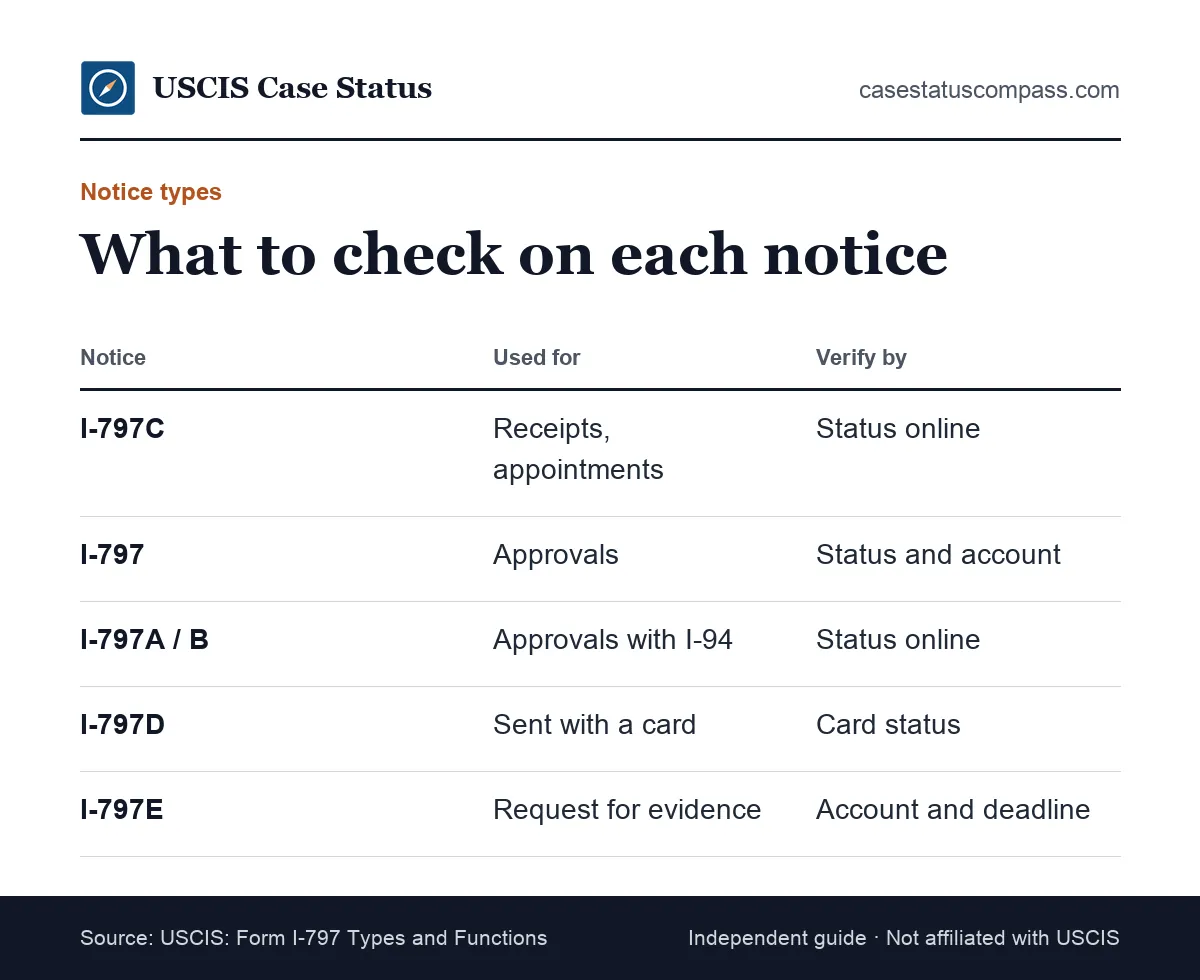
The I-797 family
Find the letter after "I-797" printed on your notice, then use the matching row to pick the fastest check.
| Notice | What USCIS uses it for | Best way to verify |
|---|---|---|
| I-797 | Receipt or approval of an application or petition | Status online plus account copy |
| I-797A | Approval that replaces Form I-94 | Status online; check the I-94 details |
| I-797B | Approval of an alien worker petition | Status online; ask the employer for the original |
| I-797C | Receipts, rejections, transfers, appointments, re-opened cases | Status online; account documents |
| I-797D | Sent with benefit cards | Card status in the tool |
| I-797E | Request for evidence | Account copy and the stated deadline |
| I-797F | Transportation letter issued abroad | Contact the issuing office |
Letters outside the I-797 series
USCIS also sends other letters, such as account access notices, decisions on waivers and some interview notices. For what each I-797C field means, see our I-797C notice of action guide.
How to Verify USCIS Notice Details in Seven Checks
Here is how to verify USCIS notice details in order: check the number format, search it in Case Status Online, find the notice in your account, match names and dates, screen the request, check the contact details, and call USCIS if anything is still unclear.
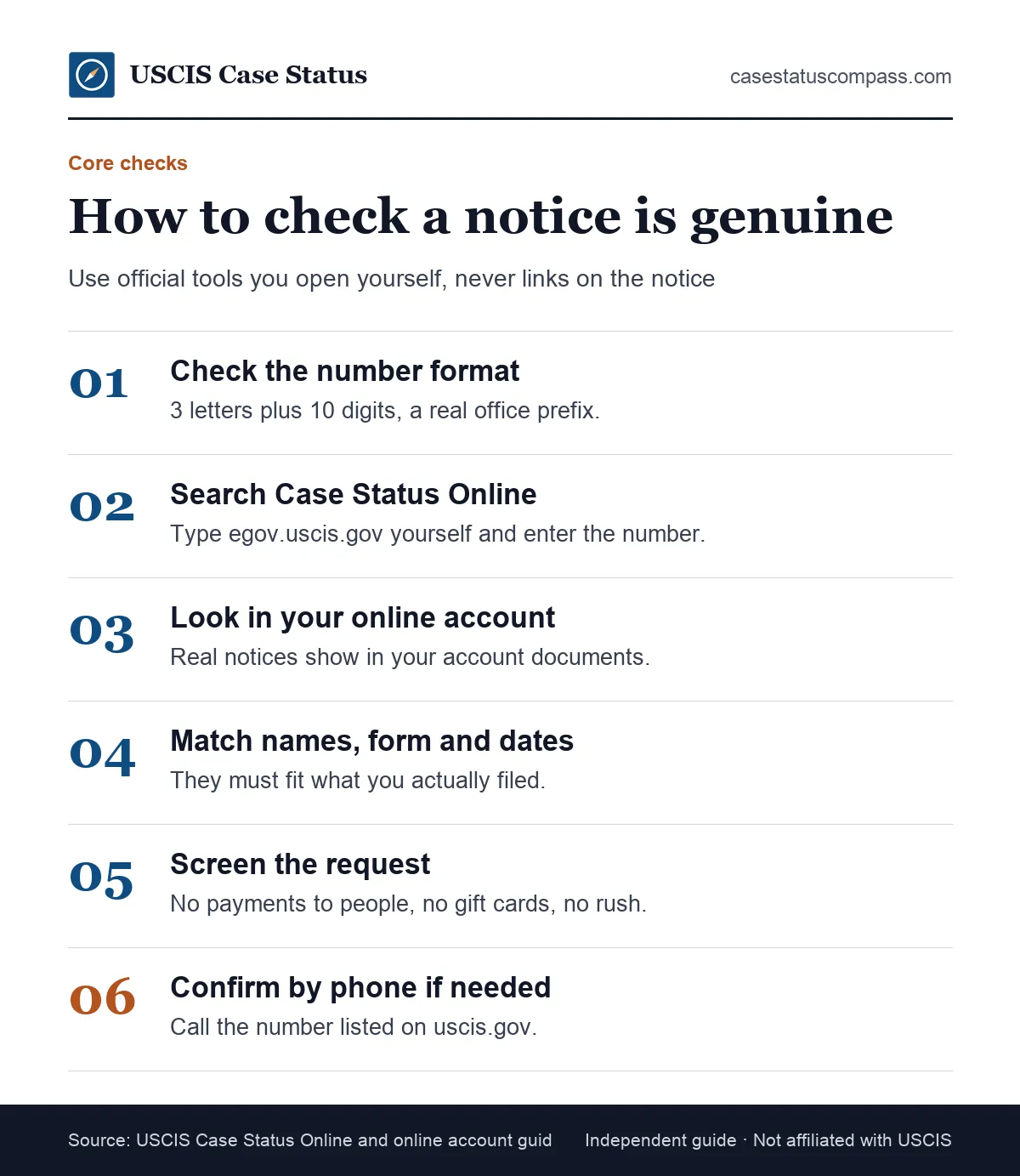
The seven checks
- Format: the receipt number follows the official pattern.
- Lookup: Case Status Online returns your case.
- Account: the notice appears in your online account.
- Match: names, form, dates and address fit your filing.
- Request: nothing unusual, such as payment to a person.
- Contacts: numbers and addresses lead to uscis.gov.
- Confirm: call or message USCIS when doubt remains.
How long the checks take
Checks 1, 2 and 4 take about five minutes with the notice and your filing copy in front of you. Check 7 depends on call wait times, so save it for notices that still look doubtful.
Check 1: Is the Receipt Number in the Right Format?
A real receipt number has 3 letters + 10 digits (13 characters), e.g. EAC2512345678; leave out dashes. A number with the wrong length, digits in the prefix or an unknown prefix cannot be a real USCIS receipt. Check it before anything else.
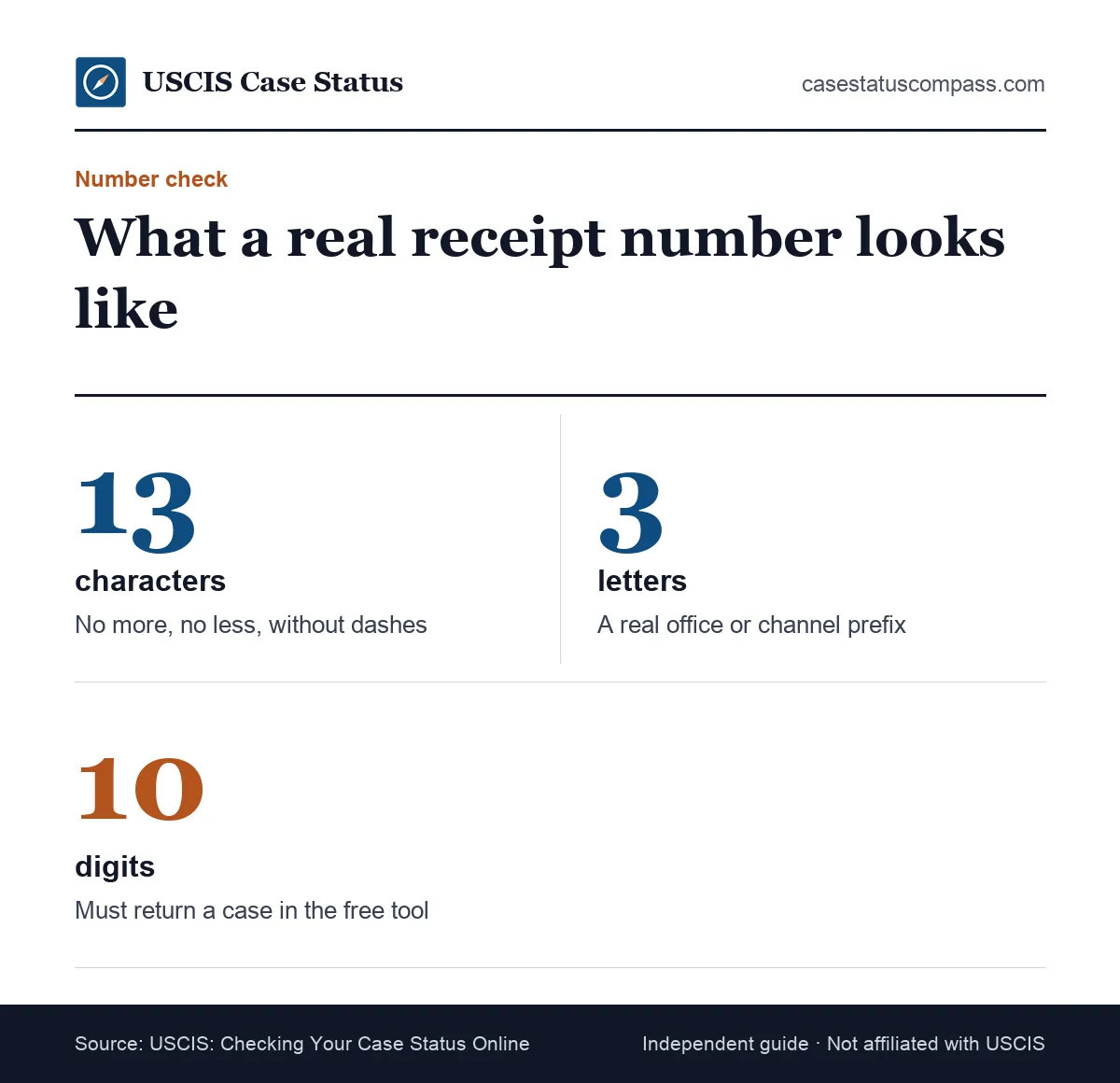
Length and characters
Count the characters, leaving out dashes and spaces. You should have exactly 13. Keep any asterisk when you search. Letters appear only at the start. A letter O in place of a zero is a common typo.
Is the Receipt Number Prefix a Real USCIS Code?
Compare the first three letters with the official list. USCIS lists these prefixes: EAC = Vermont SC; WAC = California SC; LIN = Nebraska SC; SRC = Texas SC; NBC/MSC = National Benefits Center; YSC = Potomac SC; MCT = I-539 filings; IOE = online/electronic filing. A prefix outside that list is a warning sign. Our receipt number guide explains the format in more depth.
Check 2: Does Case Status Online Show the Same Case?
Enter the receipt number yourself at Case Status Online: egov.uscis.gov. A real notice returns a status that fits the notice, such as Case Was Received for a receipt or an approval message for an approval notice. A brand-new filing may need a few days.
Type the address yourself
Never use a link or QR code printed on a notice you are testing. Open a new browser tab and type the address, or use a bookmark you saved earlier.
What a match looks like
A match means three things line up: the tool finds the number, the form type is the one you filed, and the latest action fits the notice. A mismatch on form type is a strong signal of a fake or a misprint.
Why Would a Real Receipt Number Show as Invalid?
A real number may show as invalid if the receipt is very new, if you mistyped it, or if the tool is having problems. A number that never works, combined with any other red flag, points to a fake notice.
Very new receipts
The online record can lag behind the paper notice, especially for paper filings. If the notice is only days old and everything else matches, give it some time. Our guide to a case status that is not updating explains common delays.
Typing errors and site problems
Check for a zero typed as the letter O, or a missing asterisk. If the site shows an error for every number, the problem is the site, not your notice.
Check 3: Is the Notice in Your USCIS Online Account?
Your USCIS online account shows notices for cases linked to it. If a mailed notice also appears in your account's documents, that is strong proof it is genuine. What the account offers: Free USCIS online account: case status updates, notices, link paper-filed cases.
Where notices appear
Sign in by typing the address yourself, open the case and look for the documents or notices section. Our USCIS online account guide shows how the account is organized. A case filed on paper shows its notices there only after you link it to your account, so an empty documents list may simply mean the case is not linked yet.
Why Is a Paper-Filed Notice Missing From Your Account?
Usually because the case is not linked yet. A paper-filed case shows in your account only after you link it with the online access code from your account access notice. If you have not linked the case, an empty account proves nothing. IOE receipt numbers belong to online filings; see our IOE case status guide.
Check 4: Do the Names, Form and Dates Fit Your Filing?
Every detail on a real notice should agree with what you filed. Compare the case type, your name, the received date and your mailing address with your filing copy. A notice for a form you never sent, or one dated before you mailed anything, is a warning sign.
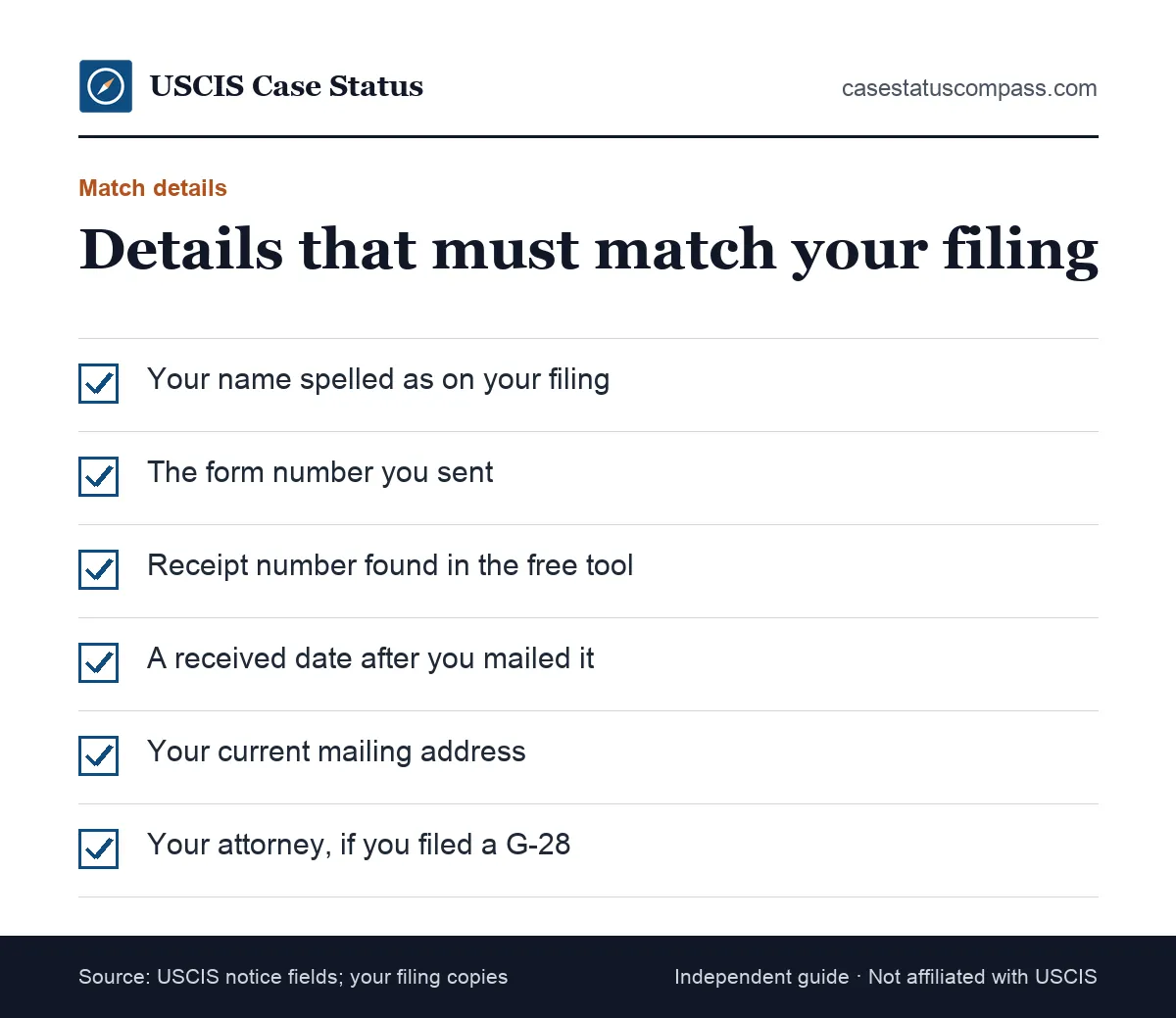
Case type and names
The case type should name the form you filed, such as I-485 or N-400. A notice for a stranger at your address is a real problem: it could be a misdirected notice or a fraud attempt.
Dates that make sense
The received date should be on or after the day USCIS got your package, and the notice date comes later. A received date before you mailed anything is a red flag. Compare both with your mailing receipt or online filing confirmation.
Check 5: Does the Notice Ask for Anything Unusual?
A genuine USCIS notice does not ask you to pay a person, buy gift cards, wire money or send cash. It does not ask for your account password. USCIS also says it does not take fees by phone or email. Any notice with such payment demands is fake.
Payment requests
Real fees are paid in your USCIS online account, through Pay.gov for some fees or with your filing as the form instructions say. The fee schedule is Form G-1055, Form G-1055, Edition 10/16/26. A notice demanding a fee that is not in G-1055 is a red flag.
Requests for secrecy or speed
Genuine notices give clear deadlines, usually weeks long, and never tell you to keep the notice secret. For example: RFE deadline: up to 12 weeks (the exact date is on your RFE); no extensions, though RFEs for Form I-539 and Form I-601A allow at most 30 days (all other forms up to 84 days), plus 3 days if mailed. A "notice" demanding a reply within hours, or telling you not to involve your attorney, is not from USCIS.
Check 6: Do the Phone Numbers and Addresses Lead to USCIS?
Compare every phone number and address on the notice with those listed on uscis.gov. If a notice lists a different "officer" number, a personal email or a messaging app, do not use it. Use official numbers only. The Contact Center number is 800-375-5283.
Official phone numbers
The USCIS Contact Center is 800-375-5283. Other lines: TTY: 800-767-1833; 212-620-3418 (callers outside the U.S.). Live calls and chat: Monday to Friday, 8 a.m. to 8 p.m. Eastern. Our USCIS contact guide lists every official line.
Office and center addresses
Notices often list a USCIS office or service center. Check that the office exists on uscis.gov. Official list: Five USCIS service centers: California, Nebraska, Potomac, Texas and Vermont. Our service centers guide explains what each one handles.
Check 7: When Should You Confirm With the Contact Center?
Call the USCIS Contact Center when a notice still looks doubtful after the first six checks, when it asks you to act soon, or when you cannot access your account. An agent can tell you whether a notice was issued for your case.
What agents can confirm
Have your receipt number, name and date of birth ready. Ask the agent whether the notice type and date match their records. Write down the agent's name or ID.
Can Emma or e-Request Help With a Notice Problem?
Yes, when the problem is a missing or mistaken notice rather than a suspected fake. You can ask Emma, USCIS's online virtual assistant (English and Spanish), on uscis.gov. For notice problems, USCIS also offers an online form: e-Request: report USCIS typos, missing notices or accommodation needs online.
What Does a Genuine I-797 Notice Look Like?
A genuine I-797 notice usually shows a Department of Homeland Security and USCIS heading, the notice type, case details, your name and address, and instructions. Looks alone cannot prove it is real, because appearance is easy to copy. Use the parts only as a first screen.
Standard parts of the notice
Most notices show a receipt number, received date, notice date, case type and page count near the top. Labels can vary slightly by notice type and over time. Missing fields are a warning.
Why the look proves nothing
USCIS does not publish a checklist of security features for I-797 notices, so you cannot authenticate a notice by its paper or print alone. That is why the checks above rely on official records, not on how a page looks.
Which Details Should Match Across Your Notices?
The same receipt number should appear on every notice for one filing, from receipt to decision. Your name, A-Number (if shown) and case type should stay consistent. A notice that breaks this pattern needs a check. Keep your notices together in date order.
Across one filing
Line up your notices for one filing and check each detail in this table, row by row.
| Detail | Should it stay the same? | If it changes |
|---|---|---|
| Receipt number | Yes, for that filing | Ask USCIS; could be a new filing or a fake |
| Case type (form) | Yes | Strong warning sign |
| Your name | Yes, apart from corrections | Check for a USCIS typo |
| A-Number | Yes, once assigned | Compare with your card; see our A-Number guide |
| Mailing address | Only if you reported a move | Update your address right away |
| Attorney listed | Only if you changed representatives | Ask your attorney |
Across a package of forms
If you filed Forms I-485, I-765 and I-131 together, expect separate receipts with different numbers. Each should name its own form. Our alien number guide explains why your A-Number stays the same across them while receipt numbers differ.
How Do You Verify a Receipt Notice?
Verify a receipt notice by entering its number in Case Status Online and confirming a status such as Case Was Received for the same form. Then match the received date with your mailing records.
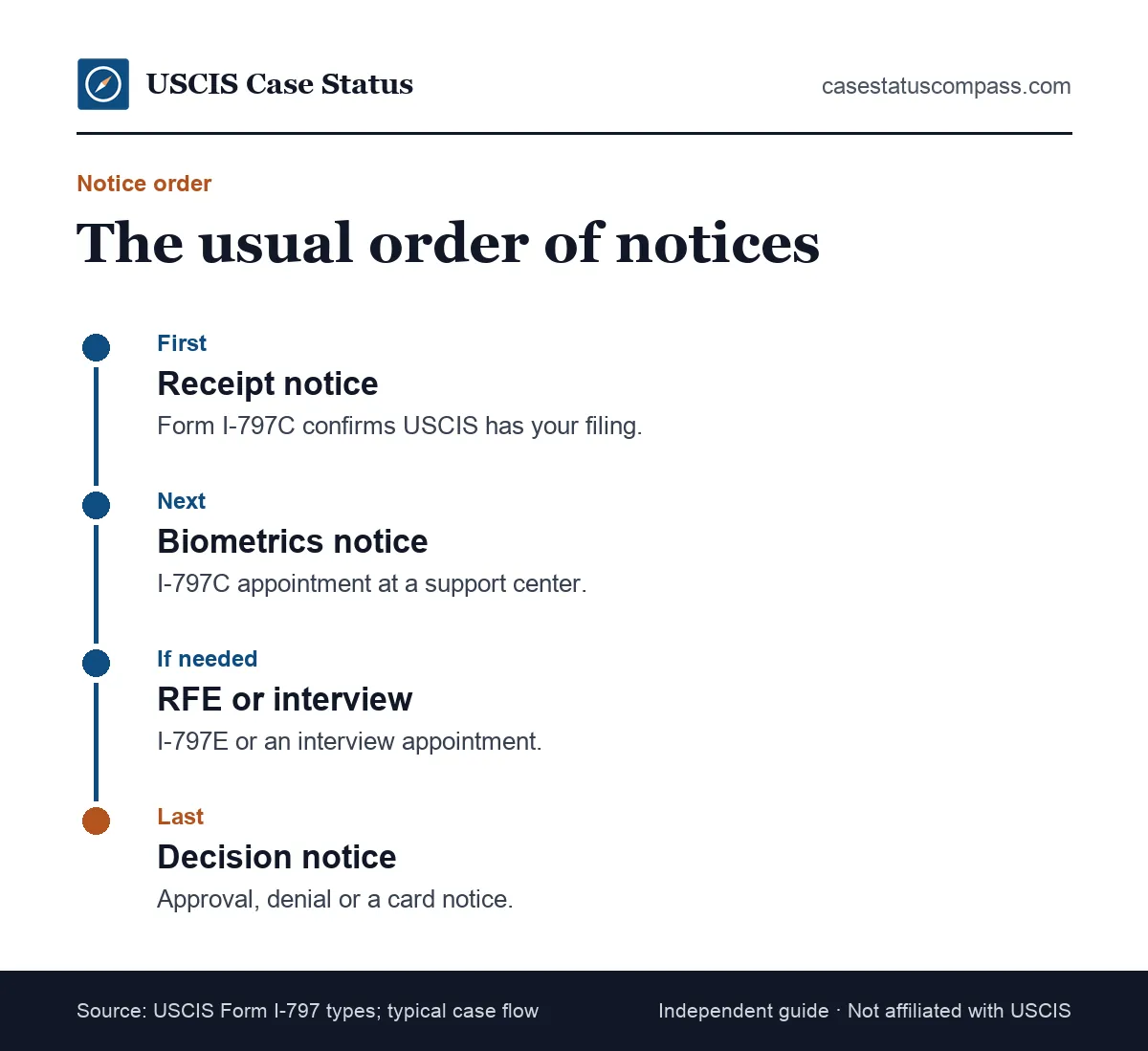
Keep in mind: I-797C = Notice of Action (receipt, rejection, transfer, appointment, re-open); not proof of status by itself.
Expected timing
A receipt usually arrives after USCIS accepts your package. A receipt that comes before you mailed anything, or for a form you never filed, is suspicious. If you are waiting on a receipt that has not come, see our guide to the case was received status.
Companion receipts
When you file several forms together, companion receipts may arrive on different days. If one never arrives, ask USCIS through e-Request. Each companion form has its own receipt number to check.
How Do You Verify an Approval Notice?
Verify an approval notice by checking that Case Status Online shows an approval for the same receipt number and that the notice appears in your account. Check the form number and the name too. An approval for a form you never filed is a red flag, not good news, and should be checked with the Contact Center.
Status and account match
Search the receipt number and read the full status text. Our case was approved guide shows the typical wording. Approvals for card cases are usually followed by card production messages.
Card follow-up updates
For green cards and work permits, approval is usually followed by card production and mailing updates. If an approval notice arrived but the status never moves on, check with USCIS. Our guide to the card was mailed status explains the next steps.
How Do You Verify a Biometrics Appointment Notice?
A genuine biometrics notice is an I-797C appointment notice that names an Application Support Center, a date and a time. Confirm it in your online account, and check that the center address is on uscis.gov. USCIS never sells appointment slots or sends them through messaging apps.
The support center location
Look up the Application Support Center address on uscis.gov and confirm it exists. To prepare, see our biometrics appointment guide: Bring your I-797C appointment notice and a valid photo ID to the ASC.
Rescheduling through official routes
If you need a new date, use only official routes: Reschedule biometrics online at least 12 hours before, with good cause, or call the Contact Center. A message offering to "move" your appointment for a fee is a scam. Missing a real appointment matters: Missing biometrics can lead to denial for abandonment.
How Do You Verify an Interview Notice?
Verify an interview notice by finding it in your online account and confirming the field office address on uscis.gov. The receipt number on the notice should match your pending case. A notice that names an office far from where you live deserves a call.
Field office and case match
Interview notices name a specific USCIS field office. Check that the office exists and that the notice covers the form you filed, such as an I-485 or N-400. Our USCIS interview hub explains each interview type.
Changing an interview date
To reschedule, follow the instructions on the notice and confirm them through the Contact Center. Our green card interview guide covers what to expect. Never reschedule through a number on an email.
How Do You Verify an RFE or NOID Is Real?
A real request for evidence (RFE) or notice of intent to deny (NOID) names your receipt number and specific missing evidence, with a deadline. Find it in your online account and confirm the status online. Deadline rules: RFE deadline: up to 12 weeks (the exact date is on your RFE); no extensions. NOID deadline: up to 30 days; no extensions.
Deadlines on a real notice
A real RFE or NOID prints an exact due date. Mail rule: If USCIS mailed the notice, add 3 days to the deadline. Our request for evidence guide and notice of intent to deny guide explain each step.
How responses are sent
Responses go to the address or upload option on the notice itself, checked against uscis.gov. An RFE never asks you to email documents to a personal address or to pay a "review fee" to an officer.
How Do You Verify a Denial Notice?
Verify a denial by checking that Case Status Online shows a denial for the same receipt number and that the notice appears in your account. A denial with no matching status needs a call to USCIS. Do not refile or pay anyone until you know it is real.
Real denials
A real denial explains the reason and your options, such as an appeal or motion. Deadlines are strict: Appeal or motion: file within 30 days (33 if the decision was mailed). Read our case denied help guide before you decide, and talk to an attorney.
How Do You Verify a Rejection Notice?
Check for a rejection status online or a returned package. A rejection means USCIS did not accept your filing, often because of a fee or edition problem. Compare it with your filing copy and check the form edition before you refile.
How Do You Verify a Transfer Notice?
A real transfer notice keeps the same receipt number and names the new office. Case Status Online should show that the case was transferred. If a "transfer" notice asks you to pay a fee or send documents to a new address that is not on uscis.gov, it is fake.
The status should match
Search the receipt number. You should see a transfer message that fits the notice date. It may show a day or two later. Our case was transferred guide explains what a move between offices means.
The receipt number stays the same
A transfer does not create a new receipt number for that filing. A transfer notice with a different receipt number than your original receipt needs a call to USCIS. Transfers never come with a fee.
How to Verify USCIS Notice Emails and Text Alerts
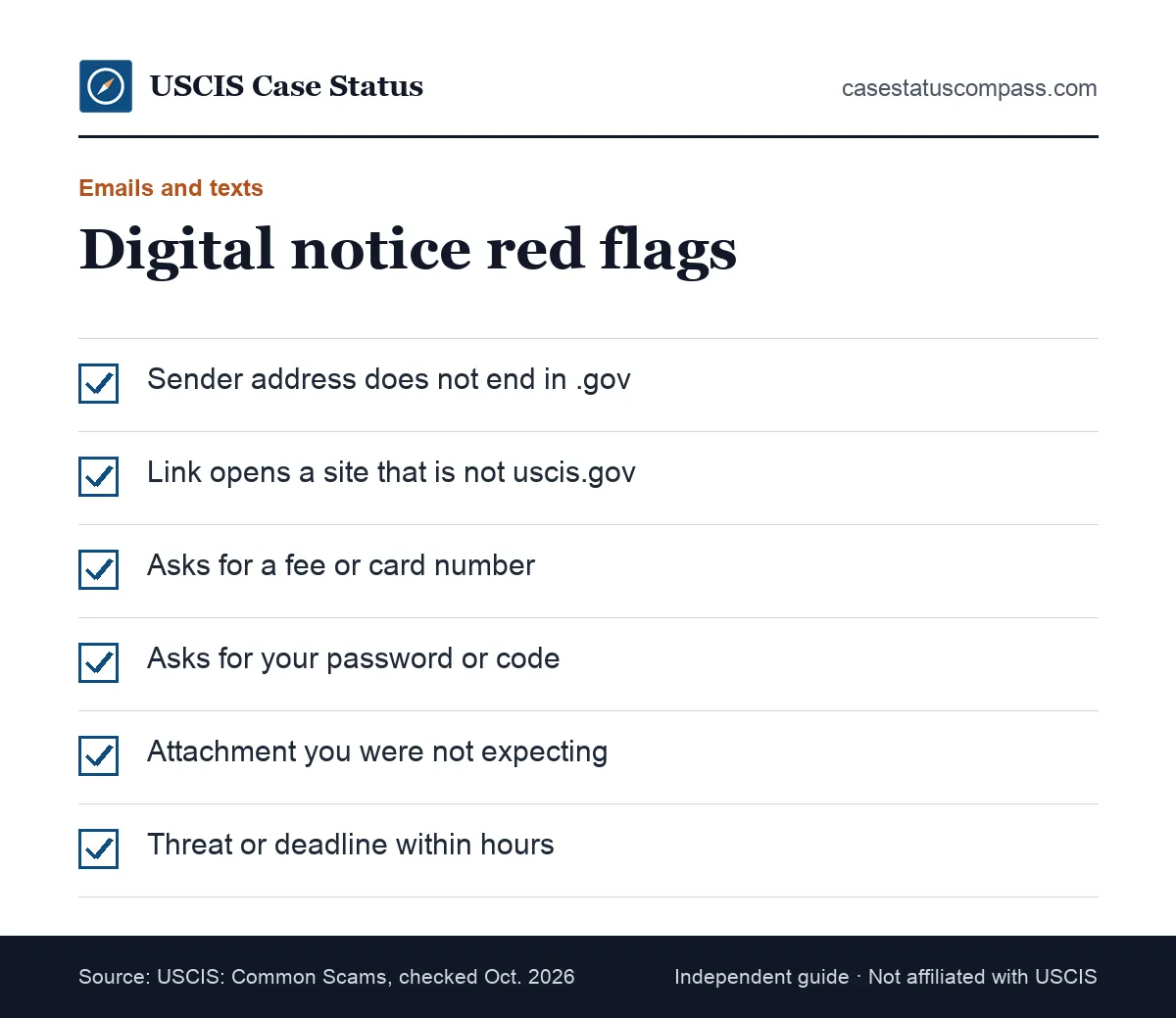
To check an email or text that claims to be a USCIS notice, look at the sender's full address and do not click any link. Then open Case Status Online or your account yourself. Real USCIS alerts tell you to check your status; they never ask for payment or passwords.
The sender address
Real USCIS email addresses end in .gov. Display names are easy to fake, so check the full address behind the name. A .com, .org or free-mail address is a warning.
Links and attachments
Do not open attachments or links in a message you are testing. If the message says a notice is waiting, sign in to your account through the address you type yourself.
Forwarding a suspicious email
If the notice is not in your account, forward the message to the USCIS webmaster address listed on uscis.gov: [email protected] (for reporting websites or social media accounts falsely claiming to be USCIS). Do not reply to the sender.
What If Your Paper Notice and Online Status Disagree?
Paper notices and online status can briefly disagree because each updates on its own schedule. A paper notice that the online record never reflects, especially one that asks you to act, deserves a call to the Contact Center. Write down the date of the call and any reference the agent gives you, in case you need to escalate later.
Timing gaps
A status may update before the paper notice arrives, or the notice may arrive first. Our guide to what happens when USCIS takes an action on your case explains one common gap.
When to ask USCIS
Ask when the notice gives a deadline and the status shows nothing, or when the notice and status describe different forms. Have the receipt number ready, and ask which record is correct.
Why Did You Get Two Copies of the Same Notice?
If an attorney or accredited representative filed Form G-28 for you, USCIS may send the original notice to them and a courtesy copy to you. Two matching copies are normal. A second copy that differs in any detail, or arrives when no one represents you, deserves the same checks as any other notice.
Original vs courtesy copy
The original and the courtesy copy should match in every field. If your attorney never got a notice you received, compare it with your online account before acting. Tell your attorney.
Duplicate notices from a reprint
USCIS sometimes reissues a notice, for example after a correction. The receipt number should stay the same. If anything else changes, confirm the reason with USCIS. Keep both copies together.
Can You Verify a Notice Without the Receipt Number?
Yes, but it is harder. Sign in to your online account to look for notices, or call the Contact Center with your name, date of birth and A-Number. A notice with no receipt number at all is unusual for case notices and deserves extra care.
Using your online account
Your account lists notices for linked cases, even if you lost the paper. You can also find the receipt number there. Download copies for your records and your attorney.
Using other identifiers
Agents may be able to find your case using your A-Number and personal details. Our A-Number guide explains where to find it. Never give these details to a caller who contacted you first.
A Printable Notice Verification Checklist
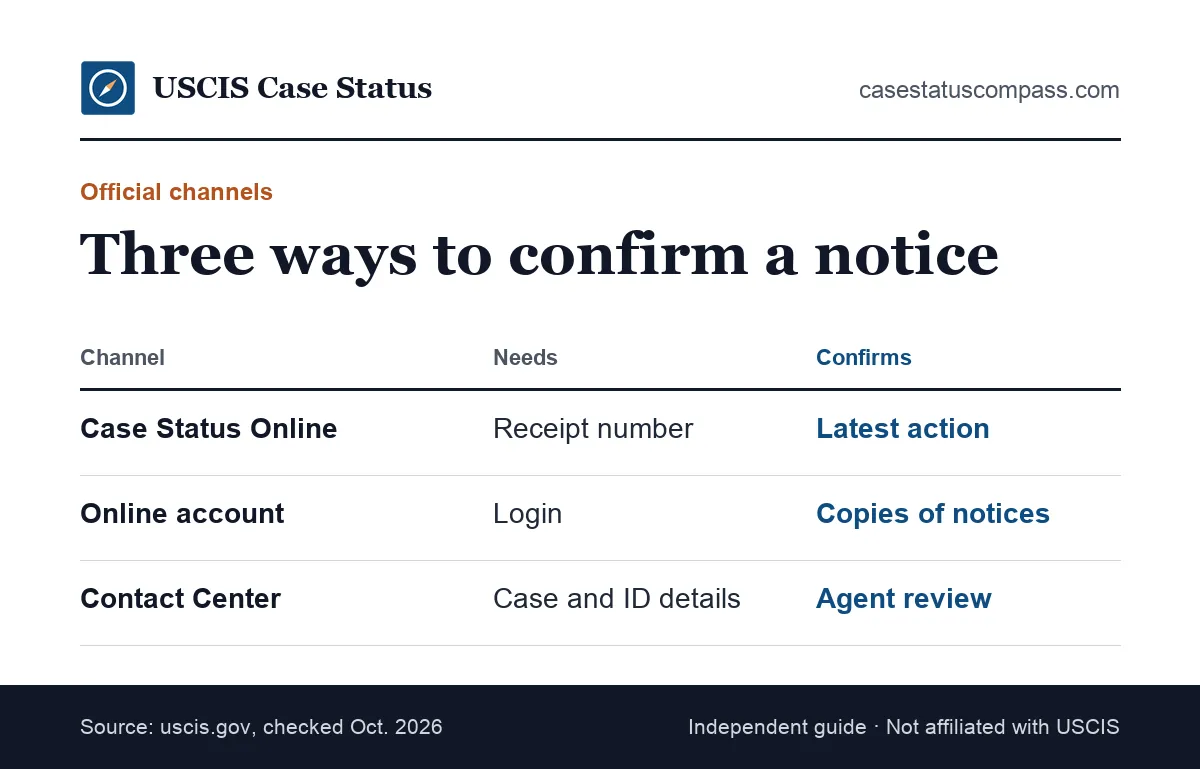
Use this checklist every time a notice asks you to pay, travel, attend or reply. If any line fails, stop and confirm with USCIS before acting. The first group checks the case record; the second checks what the notice asks you to do. Running every line, every time, is the most reliable answer to how to verify USCIS notice requests before money or a deadline is at stake.
Record checks before you act
- Receipt number has 3 letters and 10 digits
- Prefix is a real USCIS office or IOE
- Case Status Online finds the same form
- Notice appears in your online account
- Names, form, dates and address match your filing
Content and contact checks
Then read what the notice asks of you and who it tells you to contact:
- No payment to a person, gift card or wire
- Phone numbers and addresses match uscis.gov
- Deadline is printed as a date, not "today"
After you verify
Write the date you checked and the result on your copy of the notice. Add it to your calendar if it has a deadline or appointment. If the notice failed a check, report it and keep it as evidence.
Genuine vs Suspicious Notice: How Do They Compare?
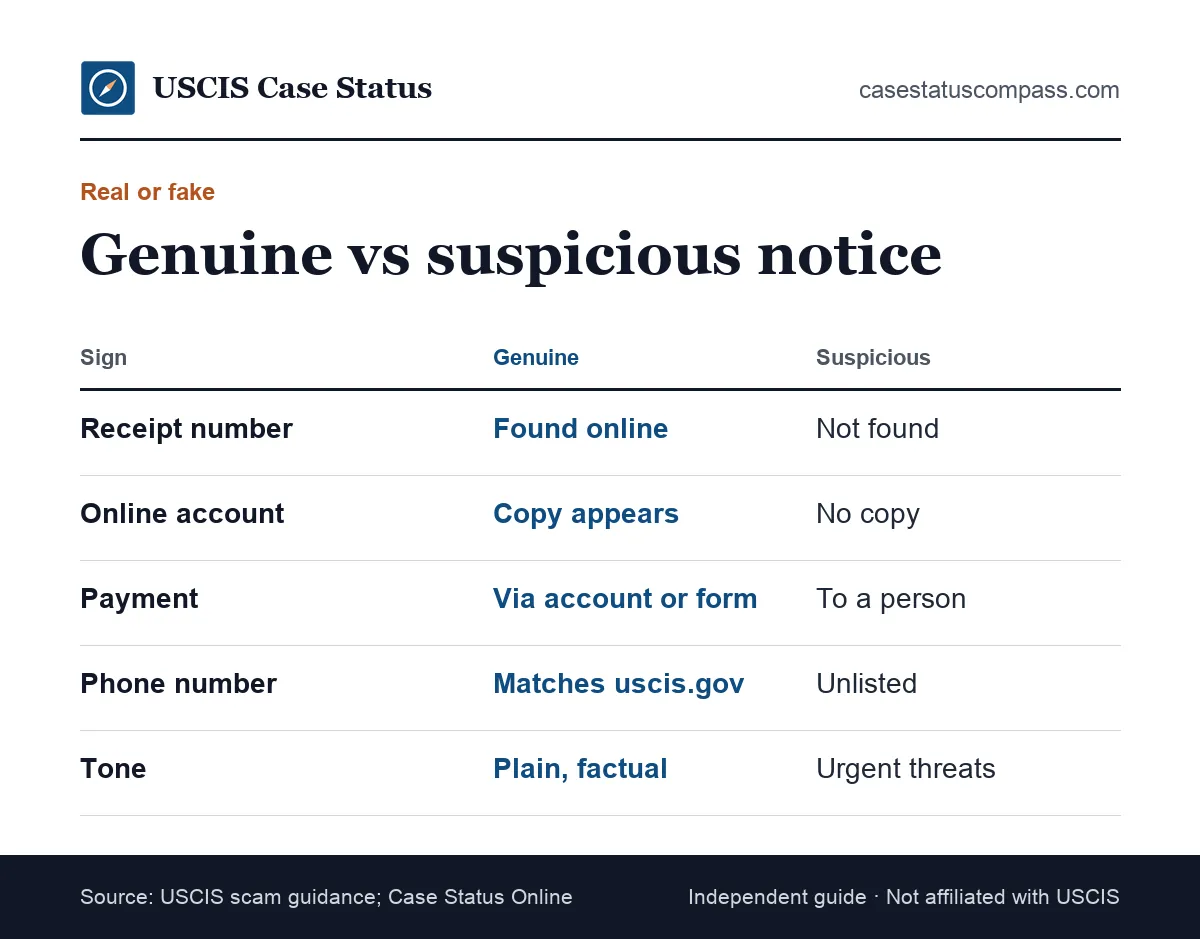
A genuine notice can be confirmed through tools you open yourself and never asks for unusual payment. A suspicious notice fails a lookup, lists unofficial contacts or pushes you to act within hours. One failed sign is enough to stop and check.
Signs on paper
Read across each row and count how many signs on your notice fall in the right column.
| Sign | Genuine notice | Suspicious notice |
|---|---|---|
| Receipt number | Returns your case online | Invalid or returns a different form |
| Online account | Same notice in your documents | No matching notice |
| Fee request | Only fees from G-1055, paid officially | Fee to a person, gift card or wire |
| Contact details | Match uscis.gov | Personal numbers or emails |
| Deadline | Weeks, with a printed date | Hours, or "today" |
| Tone | Plain and factual | Threats of arrest or deportation |
Signs in digital messages
Emails and texts add more clues: the sender address, link destinations and attachments. A fake one asks you to log in through its own link or pay. Treat any digital notice as unverified until your account confirms it.
Worked Example: Checking a Mailed I-797C
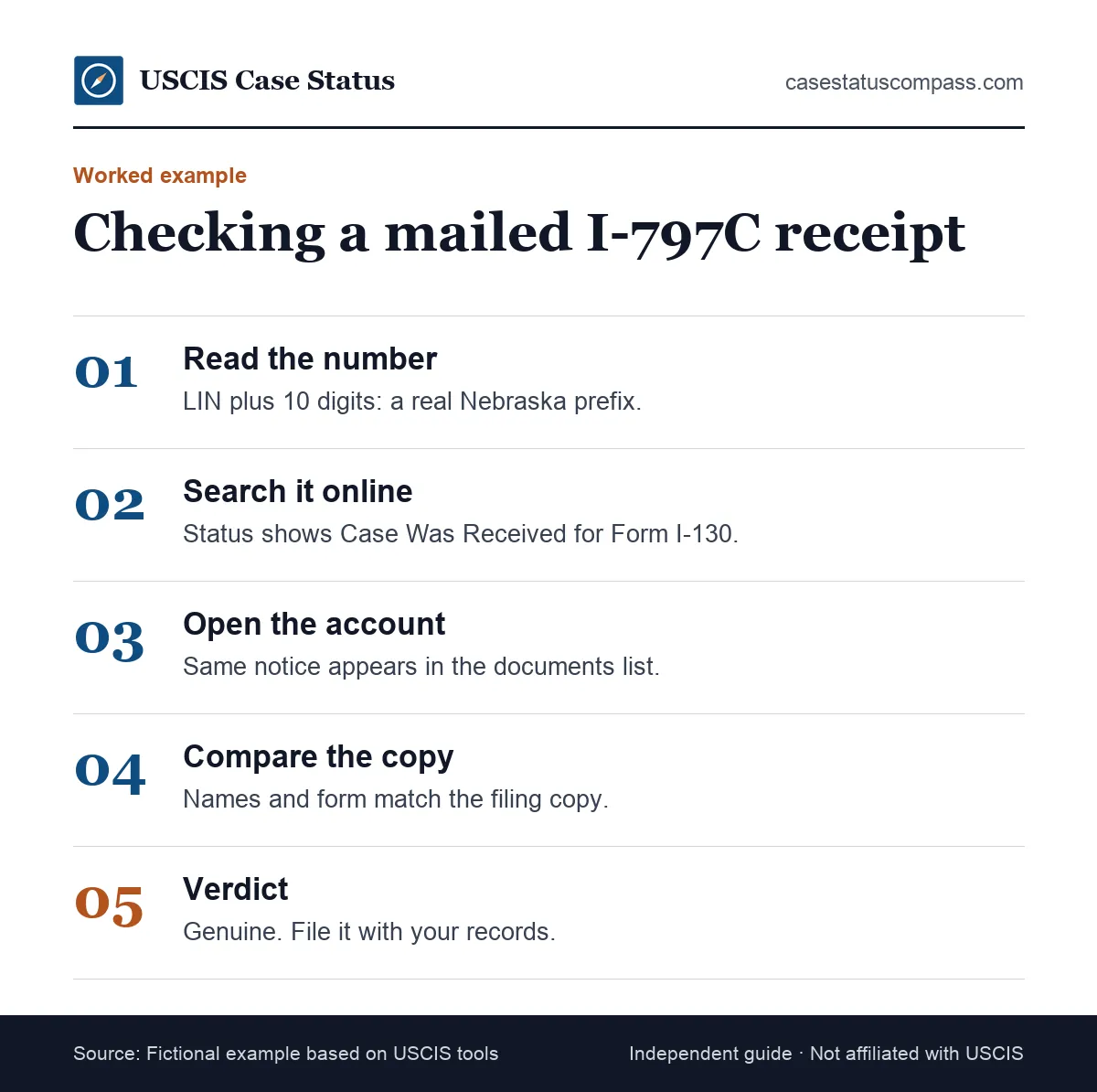
This fictional example shows a full check of a mailed I-797C receipt notice. It follows the checks in order: format, status lookup, account match and details. The whole check took a few minutes and needed nothing beyond the notice, a browser and her own filing copy.
The notice
Ana, a fictional petitioner, receives an I-797C for Form I-130 with a receipt number starting LIN. The notice says the case was received and gives a notice date two weeks after she mailed her package.
The checks and verdict
Ana counts 13 characters and confirms LIN is a real prefix. Case Status Online shows "Case Was Received" for Form I-130. After linking her paper case, she finds the same notice in her account. Her name matches. Verdict: genuine.
Worked Example: Checking an Emailed "Approval"
This fictional example shows an email that claimed to be a USCIS approval. The pattern matches USCIS warnings about emails that announce approvals and ask for fees. Notice how quickly the checks expose it, without any call, click or payment.
The email
Omar, a fictional applicant, gets an email saying his green card is approved and a delivery fee is due within 24 hours. The sender's name says USCIS, but the address ends in .com.
What Omar checked
Omar does not click. He types egov.uscis.gov and enters his own receipt number: the status shows his case is still being processed. His account has no approval notice. With neither official record showing an approval, the email cannot be genuine, and the fee it demands is the giveaway.
Omar's verdict and report
Verdict: fake. Omar forwards the email to the USCIS webmaster, reports it to the FTC and pays nothing. He deletes the email only after reporting it and notes the date in his log.
What Should You Do If a Notice Turns Out to Be Fake?
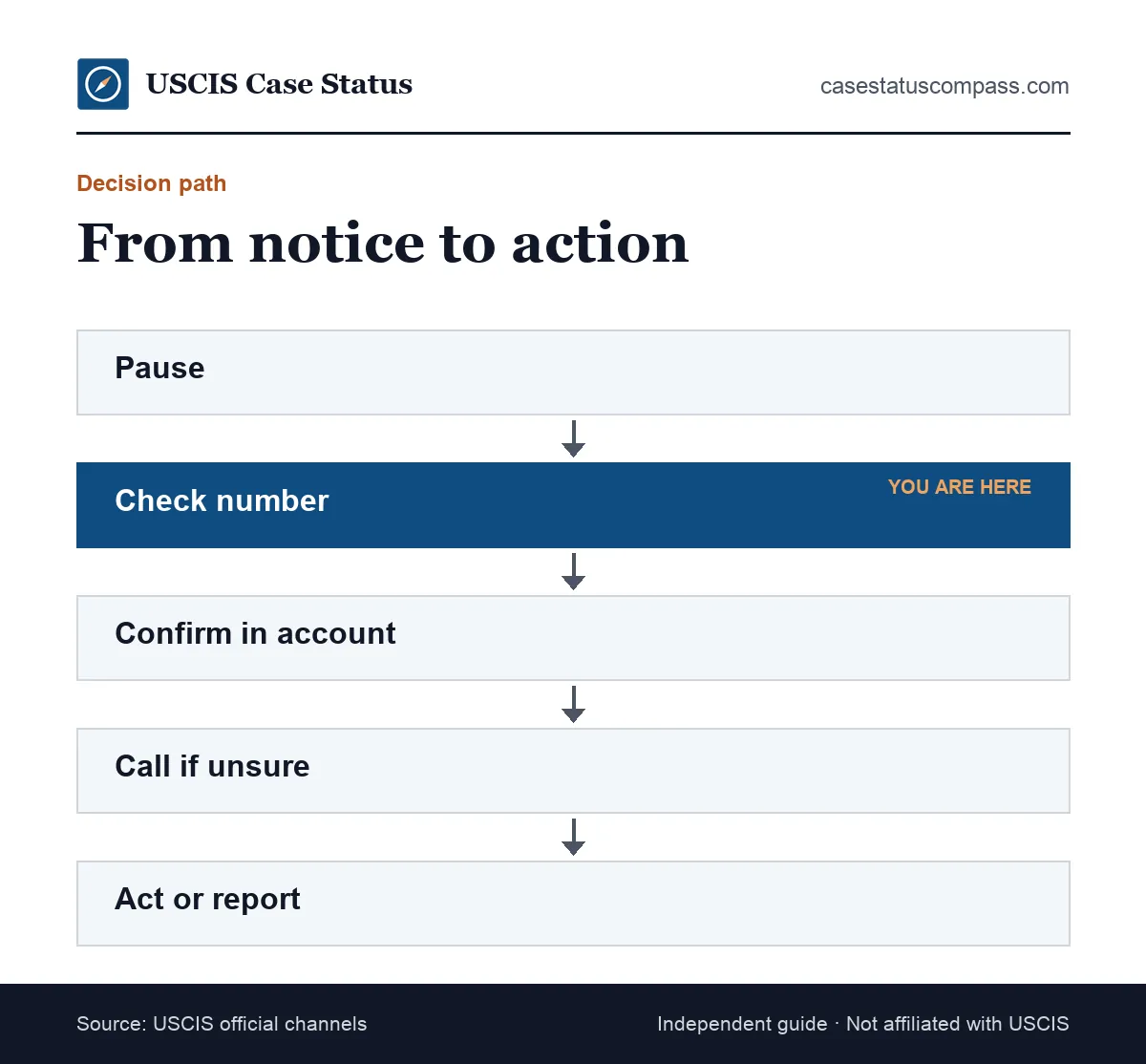
Do not reply, pay or call any number on it. Keep the notice or message as evidence. Report it to the FTC at ReportFraud.ftc.gov, and forward fake emails to the USCIS webmaster address listed on uscis.gov. If you shared personal data, secure your online account right away.
Protect your accounts
Change your USCIS online account password and check your two-step settings. If you paid, call your bank or card issuer right away. Our USCIS scam guide lists recovery steps and every place to report.
Tell people you trust
If the fake came through a community group or a helper, warn others. USCIS states that reporting a scam does not affect your immigration case. Share the warning signs, not your notice.
What If the Notice Is Real but Contains an Error?
If a genuine notice has a USCIS typo, such as a misspelled name or wrong date of birth, ask USCIS to fix it. Many errors can go through USCIS's online form. e-Request: report USCIS typos, missing notices or accommodation needs online.
USCIS typing errors
Compare the notice with your filing copy. If your form was correct and the notice is wrong, it is a USCIS error. Report it through e-Request and keep the confirmation.
Errors that came from your own form
If the error came from your own form, the fix may need a new filing or a correction request. The e-Request route covers USCIS mistakes, so check your filed copy first.
What If a Notice Shows the Wrong Address?
Fix it quickly, because a wrong address on a notice means future mail may go astray. Report a new address to USCIS within 10 days of moving (INA 265). Our change of address guide explains how to update it. Then compare the address on the next notice you receive with the one you submitted.
How Should You Record and Store Verified Notices?
Keep every verified notice with a note of how and when you checked it. Store originals in a safe place and keep a scan. A short verification log gives your attorney a clear record if a notice is ever questioned.
A simple verification log
Record every check in a log like this one so you can prove what you saw and when.
| Date checked | Notice type | Receipt number | Checks passed | Result |
|---|---|---|---|---|
| Example: Oct. 20 | I-797C receipt | LIN (13 characters) | Format, status, account | Genuine |
| Example: Oct. 24 | Email "approval" | Same number | None | Fake, reported |
Is It Safe to Post a USCIS Notice Online?
No. Do not post notices on social media, even with parts hidden; scammers use these images to make convincing fakes. Keep originals in a folder with your filing copies. Share copies only with your attorney or accredited representative, never in public groups.
Common Mistakes When Checking a USCIS Notice
The most common mistakes are calling the number printed on a suspicious notice, clicking links in emails, trusting logos and assuming an empty account means a fake. Paper cases appear only after linking, so an empty account can be normal. Each mistake below has a simple fix.
Using the contact details on the notice
If a notice is fake, its phone number reaches the scammer. Always find the number on uscis.gov yourself, and never scan a QR code on the page. Call from your own list.
Trusting logos or an empty account
A seal or logo is easy to copy, so it proves nothing. An empty online account is not proof of a fake either; a paper-filed case may simply not be linked yet.
Ignoring a real notice
Some people decide a real notice is fake because it is not yet online, then miss an interview or RFE deadline. If a notice could be real, confirm with USCIS quickly rather than ignoring it.
If X, Do Y: Notice Verification Decision Table
Use this table to decide what to do after your checks. Find the row that matches your result.
| If this happens | Do this |
|---|---|
| Number valid, status and account match | Treat as genuine; follow its instructions |
| Number valid, not yet in account | Link your paper case; recheck in a few days |
| Number invalid after retries | Call the Contact Center; do not pay anything |
| Notice asks for payment to a person | Treat as fake; report to the FTC |
| Email or text with a link | Do not click; check your account yourself |
| Real notice, wrong details | Send an e-Request or ask your attorney |
| Real notice with a near deadline | Act now; ask questions in parallel |
When a deadline is close
If a notice might be real and its deadline is days away, do not wait for perfect proof. Prepare your response while you confirm. Our case help hub lists official routes when you need answers fast.
When Should You Ask an Attorney to Review a Notice?
Ask a licensed attorney or DOJ-accredited representative to review a notice if it is a denial, NOID, notice to appear in court or RFE you do not understand, or if you suspect someone filed in your name. Bring the notice.
Finding real legal help
Check an attorney's license with the state bar, and check accredited representatives on the Justice Department's roster. This guide is general information, not legal advice. A notario público is not a licensed attorney in the United States, so do not rely on one to judge whether a notice is real.
How Do You Check an Immigration Court Notice?
Not through USCIS tools. Court notices belong to the immigration court system, not USCIS. Our immigration court case status guide explains how to check those. An attorney can tell you whether a court notice is genuine and what to do next.
Frequently Asked Questions
Can I verify a USCIS notice online?
Yes. Enter the receipt number from the notice at egov.uscis.gov, typing the address yourself. A genuine notice returns the same form type and a status that fits the notice. For stronger proof, sign in to your USCIS online account and look for the same notice in your documents.
Does USCIS send notices by email?
USCIS mainly sends official notices by mail and makes copies available in your online account for linked cases. It may send email or text alerts that tell you to check your status. USCIS says it does not routinely email to announce approvals, and it never asks for fees by email.
Is a QR code on a USCIS notice safe to scan?
Do not use a QR code or link on a notice you are testing, because a fake notice can send you to a look-alike site. Instead, type egov.uscis.gov or the account address yourself and check the receipt number there.
How can I tell if an I-797 notice is fake?
A fake I-797 usually fails at least one check: the receipt number is invalid or returns another form, the notice is missing from your account, it asks for payment to a person, or it lists contacts not found on uscis.gov.
Why does my notice show an IOE receipt number?
An IOE prefix means the case was filed online. IOE receipts appear in the filer's USCIS online account. If you got an IOE notice for a filing you made by mail, or for a form you never filed, check with USCIS before acting on it.
Can a notice be real if Case Status Online shows nothing?
Yes, for a short time. New receipts can take time to appear online, and the site sometimes has errors. Retry after a few days. If the number still fails and the notice asks you to pay or act fast, treat it as suspicious and call the USCIS Contact Center.
Who do I call to check whether a USCIS notice is real?
Call the USCIS Contact Center at 800-375-5283, using the number listed on uscis.gov, not one printed on the notice. Have your receipt number, name and date of birth ready.
Can my employer verify my I-797 approval notice?
Employers can look at a copy you provide and may check the public status with the receipt number. For employment petitions, the employer or its attorney usually receives the original notice. You do not need to give anyone your USCIS online account login to prove a notice is genuine.
Sources
- USCIS: Checking Your Case Status Online. www.uscis.gov/tools/checking-your-case-status-online. Accessed Oct 27, 2026.
- USCIS: Form I-797 Types and Functions. www.uscis.gov/forms/filing-guidance/form-i-797-types-and-functions. Accessed Oct 27, 2026.
- USCIS: Benefits of a USCIS Online Account. www.uscis.gov/file-online/benefits-of-a-uscis-online-account. Accessed Oct 27, 2026.
- USCIS Contact Center. www.uscis.gov/contactcenter. Accessed Oct 27, 2026.
- USCIS: Common Scams. www.uscis.gov/scams-fraud-and-misconduct/avoid-scams/common-scams. Accessed Oct 27, 2026.
- USCIS: Report Immigration Scams. www.uscis.gov/scams-fraud-and-misconduct/avoid-scams/report-immigration-scams. Accessed Oct 27, 2026.
- USCIS: e-Request. egov.uscis.gov/e-request/. Accessed Oct 27, 2026.
- USCIS OLA Congressional Inquiries Refresher (2021). www.uscis.gov/sites/default/files/document/guides/Congressional-Inquiries-Refresher.pdf. Accessed Oct 27, 2026.
- USCIS Fee Schedule (Form G-1055). www.uscis.gov/g-1055. Accessed Oct 27, 2026.
- 8 CFR 103.2(b)(8)(iv) (LII). www.law.cornell.edu/cfr/text/8/103.2. Accessed Oct 27, 2026.
- USCIS Policy Manual Vol. 1, Part E, Ch. 6 (current as of Oct. 23, 2026). www.uscis.gov/policy-manual/volume-1-part-e-chapter-6. Accessed Oct 27, 2026.
- USCIS Service Center Operations Directorate (updated 07/17/2026). www.uscis.gov/about-us/organization/directorates-and-program-offices/service-center-operations-directorate. Accessed Oct 27, 2026.
- USCIS: Preparing for Your Biometric Services Appointment (updated 04/30/2026). www.uscis.gov/forms/filing-guidance/preparing-for-your-biometric-services-appointment. Accessed Oct 27, 2026.
- 8 CFR 103.8(b) (LII). www.law.cornell.edu/cfr/text/8/103.8. Accessed Oct 27, 2026.
- USCIS: Form I-290B page (updated 10/26/2026). www.uscis.gov/i-290b. Accessed Oct 27, 2026.
- USCIS: How to Change Your Address (updated 08/04/2026); 8 U.S.C. 1305(a) (LII). www.uscis.gov/addresschange. Accessed Oct 27, 2026.
casestatuscompass.com is an independent publication and is not affiliated with USCIS or any government agency. This page is general information, not legal advice. For denials, court or asylum matters, consult an immigration attorney or a DOJ-accredited representative.