Contents · 43 sections
- What Does "We Have Taken an Action on Your Case" Mean?
- Is "We Have Taken an Action on Your Case" Good News?
- Why Did USCIS Send This Update by Email?
- Why Does Your Account Show No Change After the Email?
- Common Actions Behind the Email
- What Does "Correspondence Was Received and USCIS Is Reviewing It" Mean?
- Why Does Correspondence Received Show When You Sent Nothing?
- Correspondence Received on Form I-360 Cases
- How Long Does "Correspondence Was Received" Last?
- What Does "I-485 Step 3 Completed" Mean?
- The myProgress Steps for Form I-485, Read Carefully
- Why Can I-485 Step 3 Check Off Before an Interview?
- What the Action Email Usually Means for Form I-485
- What the Action Email Usually Means for Work and Travel Permits
- What the Action Email Usually Means for Family Petitions
- What the Action Email Usually Means for Citizenship Cases
- What If the Action Email Leads to an N-400 Interview Notice?
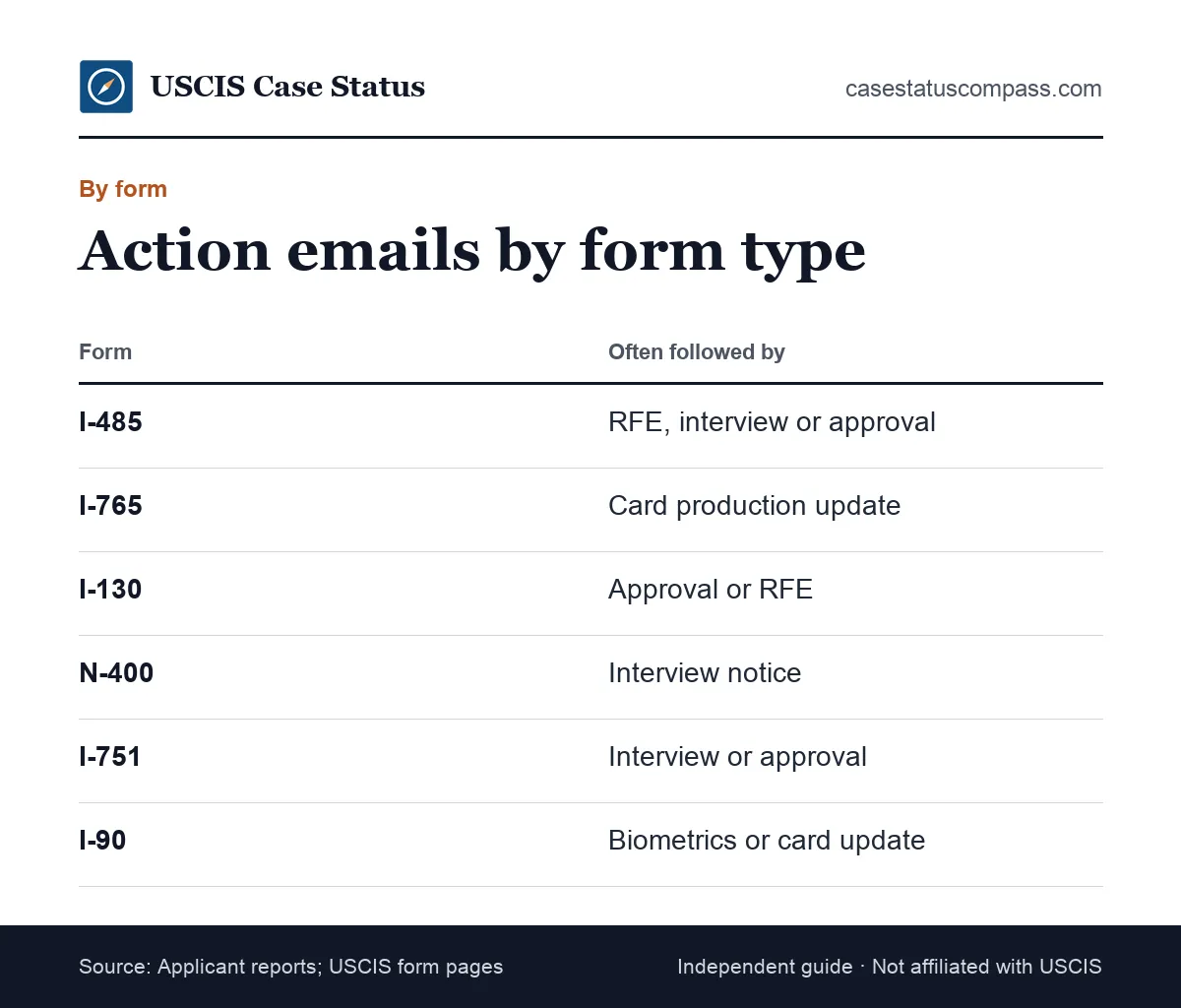
- What the Action Email Usually Means for I-751 and I-90 Cases
- What the Action Email Usually Means for Employment Petitions
- Status Flow: What Comes Before and After the Action Email
- How Long After "We Have Taken an Action" Will You See a Decision?
- What Should You Do After Getting This Email?
- Decision Table: If You See This, Do This
- How Do You Verify the Email Is Really From USCIS?
- Signs of a Fake Action Email
- What Should You Do If You Clicked a Fake USCIS Email?
- Can You Turn Case Update Emails On or Off?
- Why You Might Get Several Action Emails in a Row
- Action Email After an RFE Response
- How Do You Confirm USCIS Received Your RFE Reply?
- Action Email After Biometrics
- Can USCIS Reuse Biometrics Without an Appointment?
- Action Email After an Interview
- Action Email for Cases With an Attorney
- Mistakes to Avoid After an Action Email
- Can You Travel or Change Jobs After an Action Email?
- What Should Your Action Email Log Include?
- When Should You Contact USCIS After the Email?
- When to Talk to an Immigration Attorney
- Case Status Online vs Your Online Account
- Can the Email Mean a Denial?
- Three Action Email Scenarios
- Frequently Asked Questions
The short answer
"We have taken an action on your case" is a general USCIS email that tells you something on your file changed, but not what. It is not an approval or a denial. Sign in to your USCIS online account, read the case history and documents tab, and watch your mail for the notice that explains the action.
At a glance
| Is it a decision? | No. It only says an action happened. |
| Do you need to reply? | No. |
| Where is the detail? | Account history, documents tab or a mailed notice |
| Is it good or bad? | Neutral; the follow-up notice decides |
| Who runs this site? | An independent guide, not USCIS. |
What Does "We Have Taken an Action on Your Case" Mean?
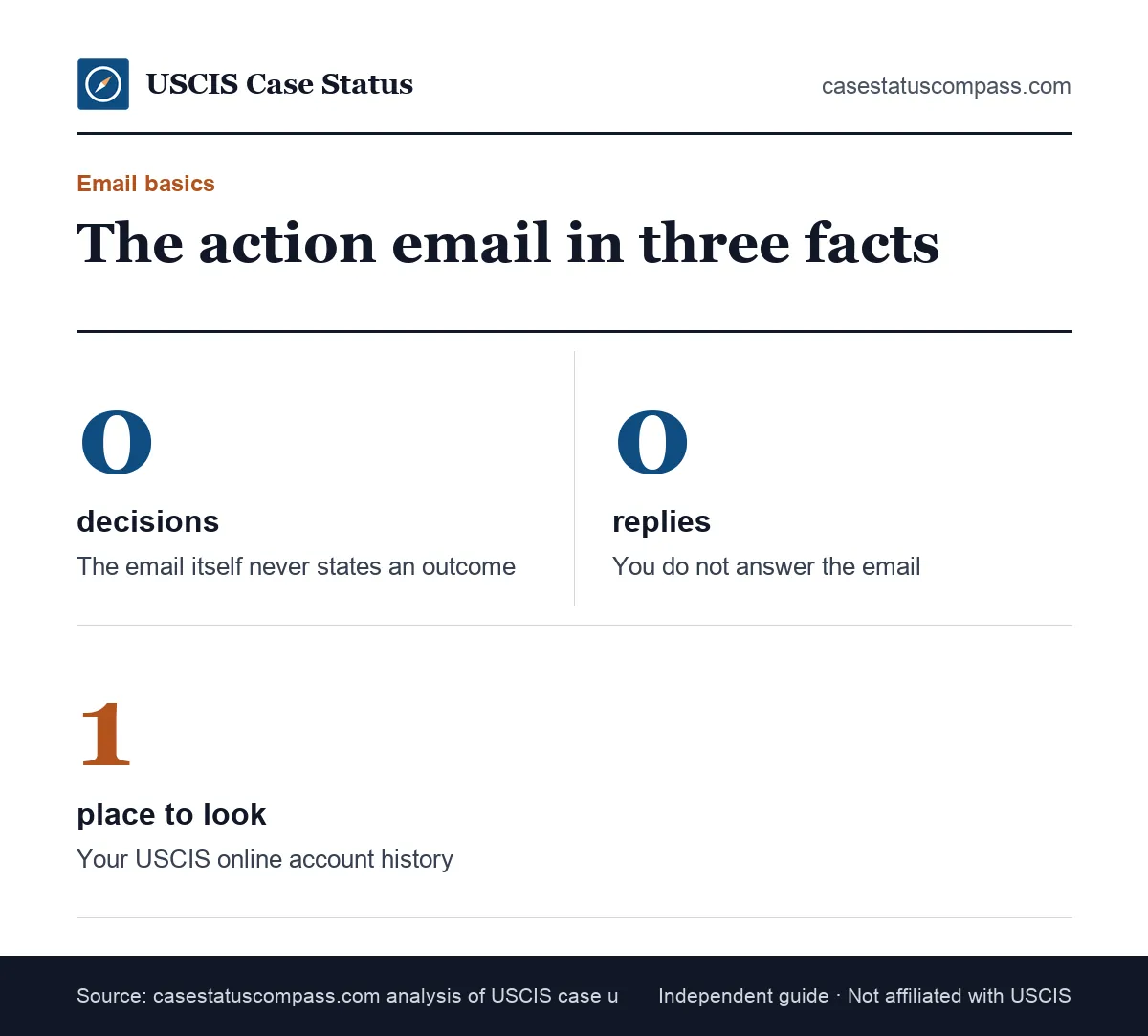
The message "we have taken an action on your case" means a USCIS employee or system made an entry on your file, without saying which. It is a heads-up to check your account, not the action itself, so the meaning depends on what appears next.
A notification, not a status title
Most updates have a title, such as "Case Was Approved." The action email only points you to the account, with no case details. Think of it as a doorbell: it rings, but you still open the door.
Why the wording is vague
Email is not a secure channel. A generic line keeps your name, decision and evidence out of an inbox others may read; the content stays behind your USCIS online account login.
Status titles that may follow
The email has no title, but the update that follows usually does, such as an RFE, an appointment notice or an approval. Our uscis case status meanings hub lists every title that might show up.
Is "We Have Taken an Action on Your Case" Good News?
The USCIS action email is neutral. It can come before an approval, an evidence request, an interview letter or a routine internal step. Read it as "something moved," then judge the news by the notice that follows.
Hold off on celebrating or worrying until you have read the notice itself.
When it often turns out well
Applicants often report the email shortly before an approval, especially on work permit and travel document cases. After biometrics, it suggests the file is with an officer, not a promise.
When it signals more work
The same email can come before a Request for Evidence (RFE), a Notice of Intent to Deny (NOID) or an interview notice. None is a denial, but each has a deadline. Our rfe meaning and response steps guide explains replying.
Why Did USCIS Send This Update by Email?
You got the we have taken an action on your case uscis email because your case is linked to a USCIS online account with notifications on. As of October 2026, we could not confirm an official page describing these alerts.
Online filers and linked paper cases
Online filings appear in the account automatically; paper filings appear after you link them with the online access code on your Account Access Notice. As of October 2026, USCIS lists these account benefits: Free USCIS online account: case status updates, notices, link paper-filed cases.
Paper filers without an account
If you filed on paper and never linked the case, you may get no emails at all. Mailed notices still arrive, and Case Status Online still shows the public status for your receipt number.
Why Does Your Account Show No Change After the Email?
The account may show no change because the action was internal: officer assignment, a security check, file review or a note on the record. These steps rarely create a public status, and updates can lag by days.
That is normal, not an error.
Internal steps that stay hidden
USCIS records many steps that never reach Case Status Online. Applicants who called after the email were often told the case was assigned to an officer: someone owns the file, but that says nothing about the result.
Give it a day before you worry
Refresh the account the next day, not every hour. A new notice usually shows in the documents tab within a few days, and the paper copy follows. Our page on uscis case status not updating covers longer silences.
Common Actions Behind the Email
Common actions behind the taken an action email include officer assignment, an RFE, an appointment notice, a transfer, a decision, or logging something you sent. The table matches each action to its clue.
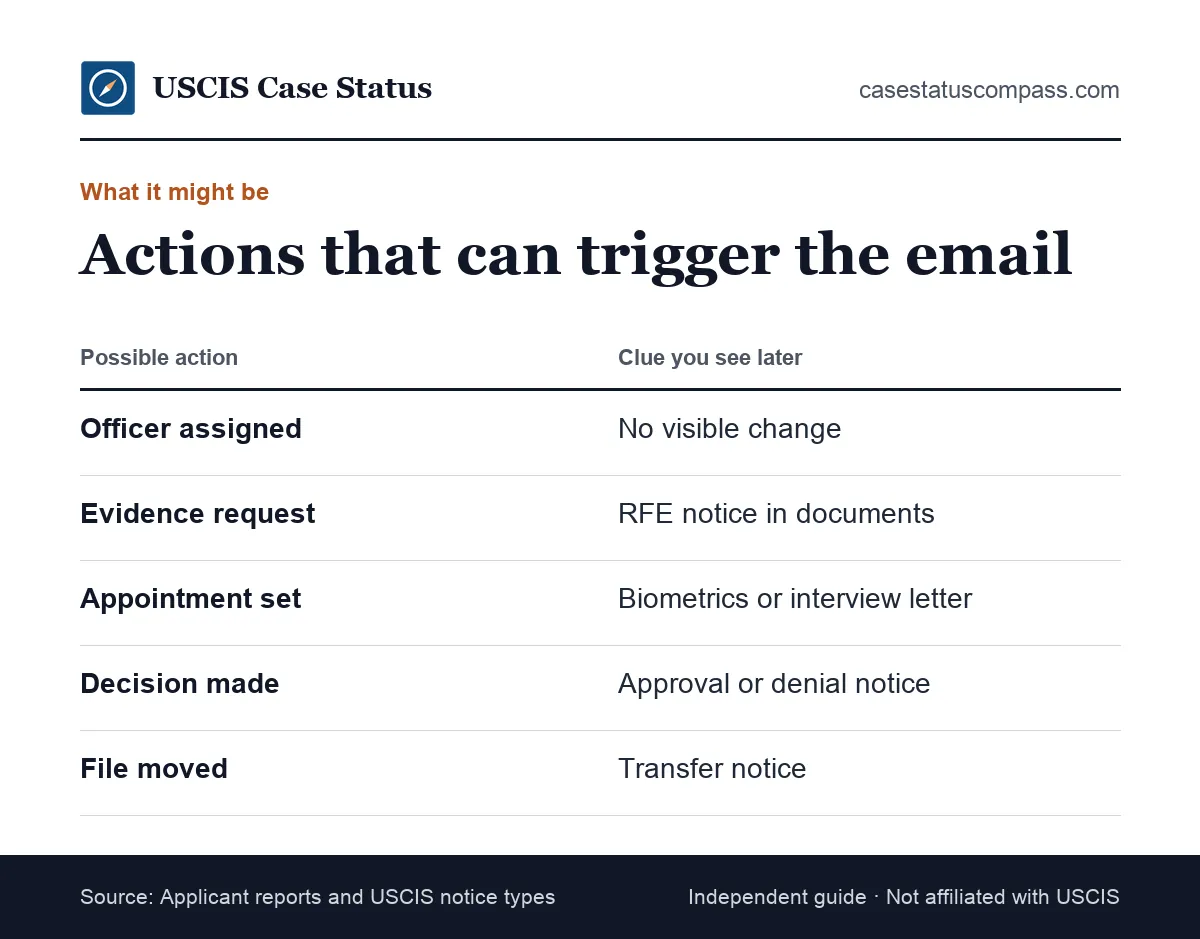
Most of them leave a visible trace within a few days, so the clue column tells you where to look first.
Matching the action to its clue
Use this table after you sign in: find the clue you can see, and the row tells you which action most likely happened.
| Action | Where the clue appears | Your move |
|---|---|---|
| Officer assigned | Nowhere visible | Wait |
| RFE issued | Documents tab, then mail | Note the deadline |
| Appointment set | Appointment notice | Calendar it |
| Case transferred | Transfer notice | Note the office |
| Decision made | Approval or denial notice | Read it in full |
| Correspondence logged | "Correspondence received" | Wait for review |
Only two rows need you to act quickly, the RFE and the appointment; every other action asks you to wait or simply read.
Transfers and other office moves
Sometimes the action is a file move. A transfer status and notice usually follow; our guide to what a case transfer means explains the new office's role. Your receipt number stays the same.
What Does "Correspondence Was Received and USCIS Is Reviewing It" Mean?
"Correspondence was received and USCIS is reviewing it" means USCIS logged a document and placed it in your file for an officer. It often follows an RFE response, a medical exam or a letter. It is not a decision.
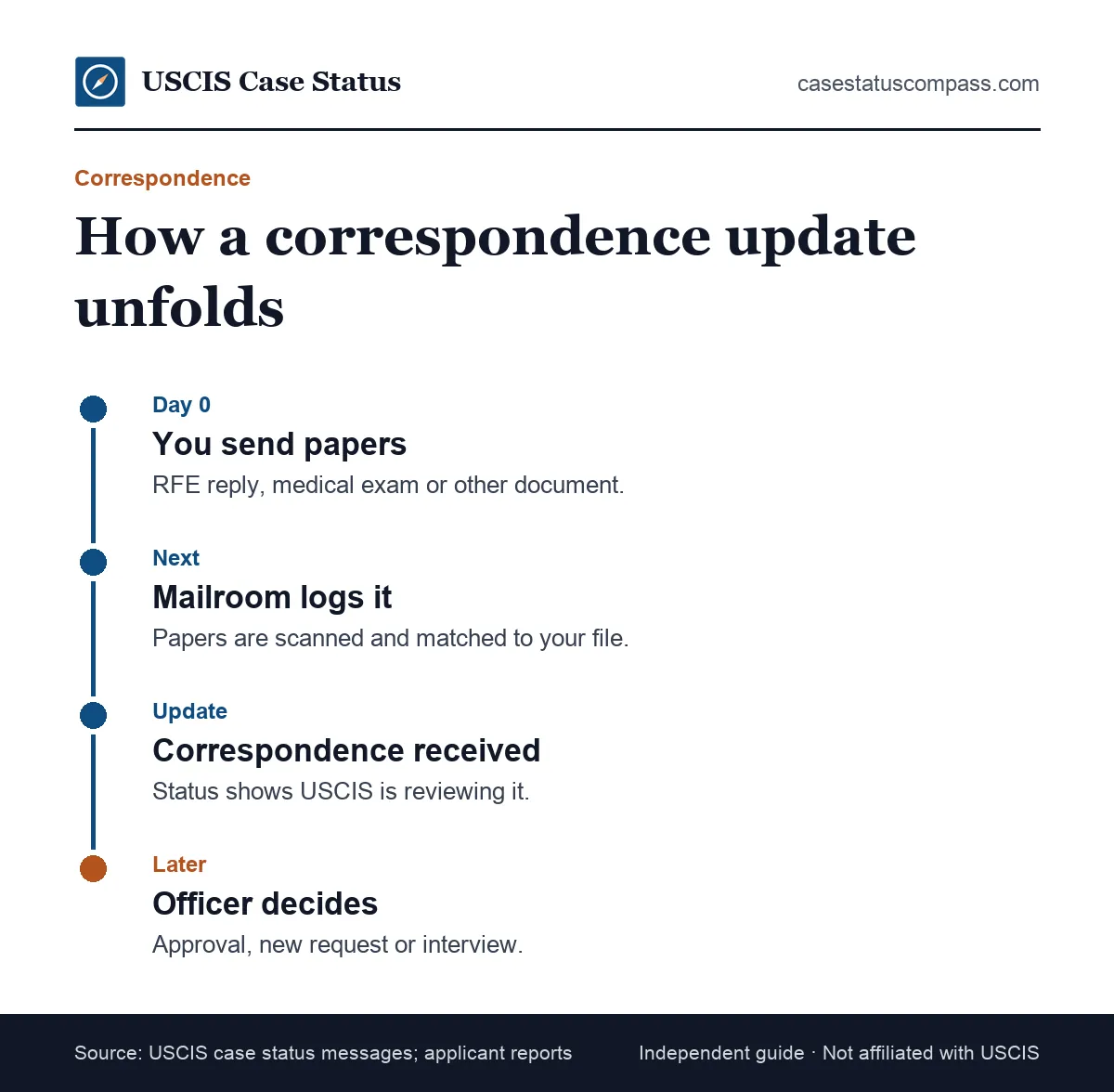
No reply is needed from you.
What counts as correspondence
- Your reply to an RFE or NOID
- A sealed Form I-693 medical exam sent after filing
- A change of address or name update
- A letter from you, your attorney or a congressional office
How it differs from the action email
The correspondence status is a named status title, while the action email is only an alert. You may get both: the email first, then this title once the document is logged.
Why Does Correspondence Received Show When You Sent Nothing?
Some applicants see this status without mailing anything. A transferred file, an attorney's submission or an internal document can also be logged as correspondence. Ask your representative first, then check whether any recent notice asked for papers.
If none of those explains the entry, keep watching your mail: any request tied to that document arrives as its own notice with its own deadline.
Correspondence Received on Form I-360 Cases
On Form I-360 cases, the correspondence was received and uscis is reviewing it i360 status usually means USCIS logged extra evidence for a special immigrant petition, which covers VAWA self-petitioners, special immigrant juveniles, religious workers and others.
It confirms the papers arrived, not that they were accepted.
Linked I-360, I-485 and I-131 filings
Many I-360 filers also have Form I-485 or Form I-131 pending, and the same correspondence can show on one receipt or several. Check each receipt number on its own; USCIS tracks every form separately.
When to get legal help on an I-360
VAWA and juvenile cases often involve safety concerns or court orders. If an update follows a request you do not understand, talk to an immigration attorney or a DOJ-accredited representative before you send more.
How Long Does "Correspondence Was Received" Last?
There is no official time limit for the correspondence received step; applicants report days to many months. Compare your whole case against the official processing times tool, not the date of this single update.
Keep proof of what you sent and when, in case the officer later says something is missing.
Why the wait varies
The wait depends on office workload, whether your reply answered every point, and whether the officer needs more checks. Missing translations and unsigned forms are common causes of a second request.
When the wait becomes a problem
If your case passes the time shown at egov.uscis.gov/processing-times for your form and office, you can submit an outside normal processing time inquiry. Until then, a long wait is normal. Our uscis processing times hub explains the posted ranges.
What Does "I-485 Step 3 Completed" Mean?
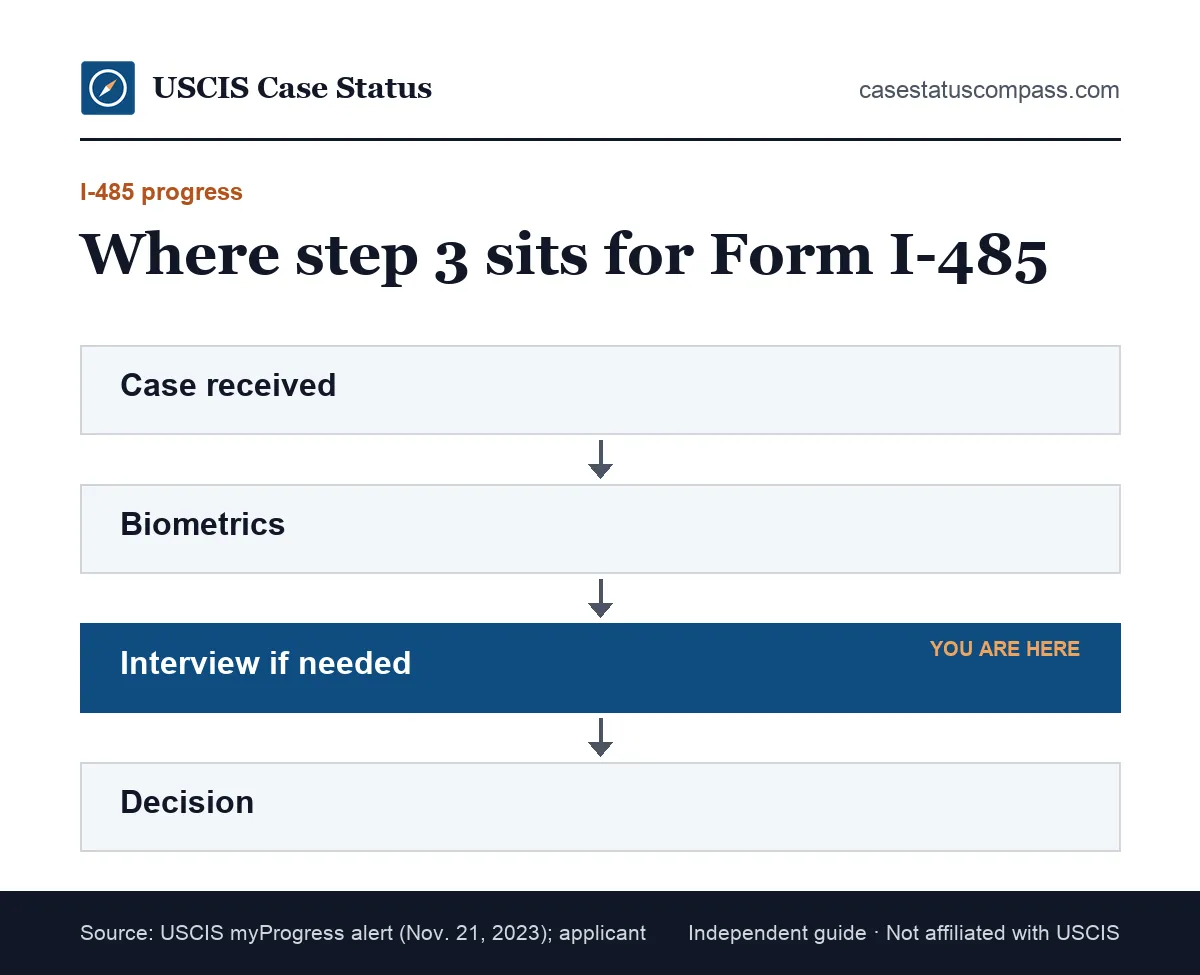
"I-485 step 3 completed" refers to the myProgress tracker for Form I-485 in your online account. Step 3 is usually the interview, if needed. A checkmark does not confirm an interview waiver; applicants report it completing before interview notices arrive.
What myProgress is
USCIS describes the tool this way: myProgress: personalized estimates in your USCIS online account (I-130, I-485, I-765, I-131, I-821, N-400, I-90). The estimates come from patterns across many cases, not your file, and USCIS says they are not guarantees.
Step 3 vs an actual waiver
The table compares the tracker's checkmark with the official notices that actually prove a step happened.
| What you see | What it proves | What it does not prove |
|---|---|---|
| Step 3 checkmark | The tracker moved | An interview waiver |
| Interview notice | An interview is set | Approval |
| Approval notice | I-485 approved | When the card arrives |
The takeaway: only a written notice proves an interview is set or waived, so keep preparing for an interview until one arrives.
The myProgress Steps for Form I-485, Read Carefully
The myProgress steps for Form I-485 track a green card case from receipt to decision, using estimates rather than your officer's notes. Our i 485 adjustment of status guide covers filing, including the 09/18/26 (01/20/25 and 09/04/26 editions rejected on/after Sept. 18, 2026; no grace period) edition rule.
The four I-485 steps
- Case received: the receipt notice is issued
- Biometrics: fingerprints and photo taken or reused
- Interview, if needed: the file reaches interview review
- Decision: approval, denial or a request
Each step's estimate can shift as USCIS updates its data.
Why Can I-485 Step 3 Check Off Before an Interview?
Applicants often report step 3 completing right after biometrics. The tracker may mark it "done" once an interview decision is possible, before the officer decides, so keep preparing until a notice says otherwise.
Treat the checkmark as a hint, not a waiver.
What the Action Email Usually Means for Form I-485
For Form I-485, the green card application, an action email often appears during officer review after biometrics. Applicants report it before RFEs, interview notices and approvals, so it does not point either way.
Check the documents tab for a new notice.
Employment-based vs family-based I-485
Employment cases depend on a current priority date and a Form I-140; family cases on the Form I-130 and visa availability. In both, the action may reflect a visa number request you will not see.
After approval: the card stages
Once Form I-485 is approved, you usually see a card production update, then a mailing update. Our guide to what new card is being produced means explains how long that step tends to take.
What the Action Email Usually Means for Work and Travel Permits
For Form I-765 (work permit) and Form I-131 (travel document), an action email often comes just before an approval or a card update. Most are decided without an interview, so it often means review is finished.
Watch for a card production update next.
Form I-765 work permit cases
An EAD, or Employment Authorization Document, is the card from an approved I-765. Ended: renewals filed on or after Oct. 30, 2025 no longer get the up-to-540-day automatic extension (exceptions: TPS by law/Federal Register notice; STEM OPT 180 days). Our work permit guide covers the filing rules.
Form I-131 advance parole cases
Advance parole lets some applicants travel and return while Form I-485 is pending, and combo cards print work and travel permission on one card. An action email may affect one receipt or both, so check each.
What the Action Email Usually Means for Family Petitions
For Form I-130 (family petition) and Form I-129F (fiancé petition), an action email often comes before an approval or an RFE; interviews are rare. Approved cases for relatives abroad usually move to the National Visa Center (NVC).
The petitioner's account gets the email, so the relative may hear about it secondhand.
Form I-130 approvals and what follows
An approved Form I-130 does not give a green card alone; the relative still needs Form I-485 inside the U.S. or an immigrant visa abroad. Our Form I-130 petition guide explains which path applies.
Petitions filed together with an I-485
When a spouse files Form I-130 and Form I-485 together, the cases may move at different speeds, so an action email on one does not mean the other moved. Do not assume one approval covers both.
What the Action Email Usually Means for Citizenship Cases
For Form N-400, the application for naturalization, an action email often comes before an interview notice. Most N-400 cases include an interview plus civics and English tests, so the action is often scheduling.
Watch for an interview notice in the documents tab.
Before and after the interview
Before the interview, the email often means scheduling. After it, the email may mean the officer recorded a decision or set the oath ceremony. Our page on the citizenship application covers the process from filing to oath.
What If the Action Email Leads to an N-400 Interview Notice?
Read the date and location at once. Missing a naturalization interview without rescheduling can cause delays or a denial. If you cannot attend, follow the rescheduling instructions on the notice before the date.
Gather your green card, passports and tax records early.
What the Action Email Usually Means for I-751 and I-90 Cases
For Form I-751 (removing conditions) and Form I-90 (replacing a green card), an action email often comes before biometrics, an evidence request or a card update, because both end in a new card.
Keep your receipt notice with your card.
Form I-751 conditional residents
I-751 receipt notice extends conditional status and work authorization for 48 months. That receipt notice, with your card, is your proof of status while you wait. Our Form I-751 guide explains joint filing and waivers.
Form I-90 renewal and replacement
I-90 receipt notice + expired card = proof of status for 36 months from the card's expiration date. An I-90 action email often means biometrics reuse or a card order. Our green card renewal guide covers each step.
What the Action Email Usually Means for Employment Petitions
For employer petitions such as Form I-140 and Form I-129, an action email often comes before an approval or an RFE. Interviews are rare, and the employer, not the worker, usually controls the account.
Ask the employer to share any new notice.
Form I-140 immigrant petitions
An approved Form I-140 lets the worker move toward a green card when the priority date is current. Because the employer or its attorney holds the account, the worker may not get the email. See our form i 140 guide.
Premium processing cases
With premium processing, USCIS acts within a set window, so an action email on an I-140 or I-129 often marks a decision or an RFE. Our premium processing guide explains the window.
Status Flow: What Comes Before and After the Action Email
The action email can arrive at almost any stage, but it often lands between active review and a decision. The table shows common before-and-after pairs so you can place your case.
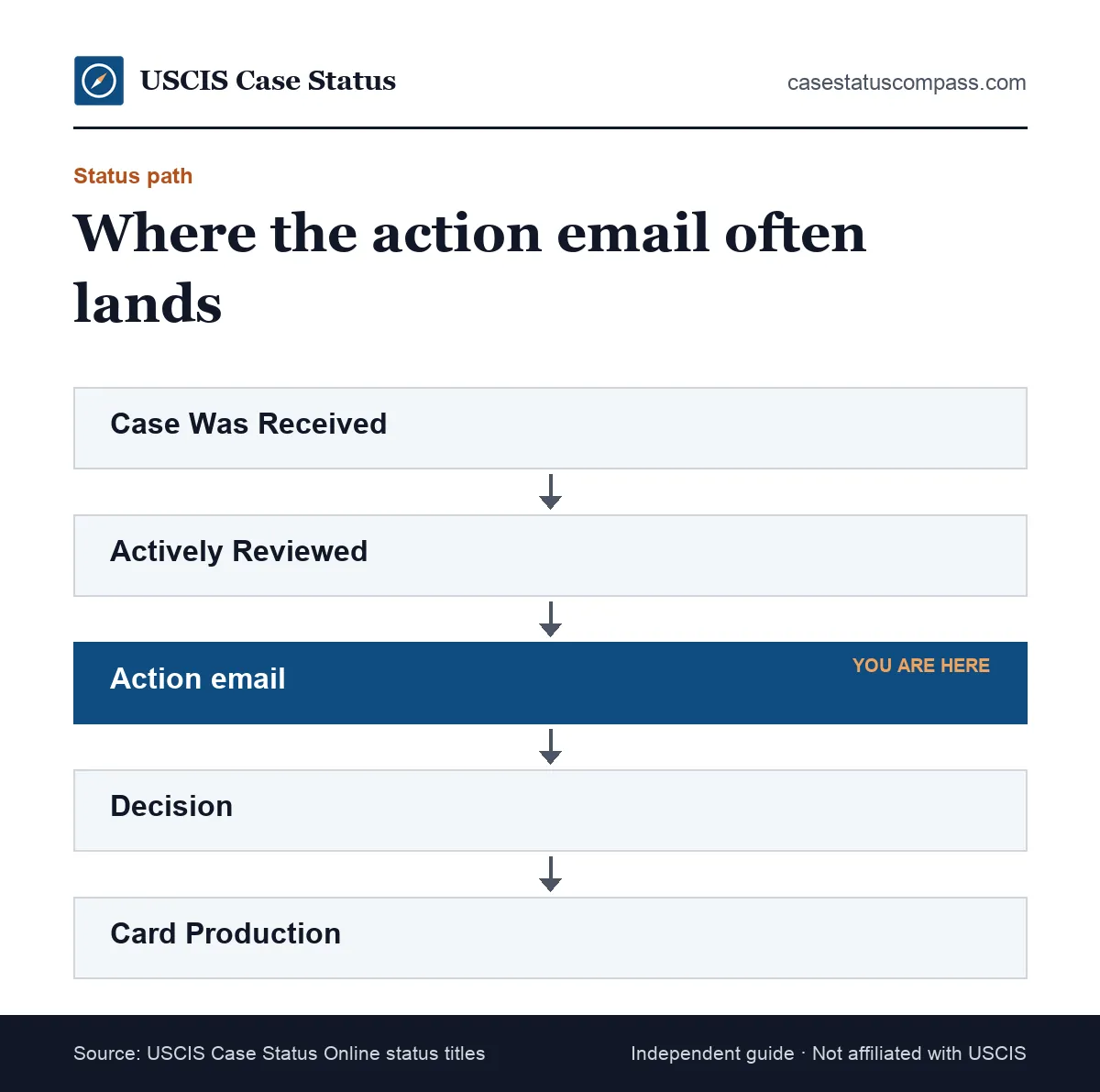
Start from the status you saw last, then read across the row.
Before and after pairs
The table pairs the status you saw before the email with the action it often marks and the update most likely to follow.
| Status before | Action | Likely status after |
|---|---|---|
| Case Was Received | Biometrics scheduled | Appointment notice |
| Actively Reviewed | Officer review | Approval or RFE |
| RFE Response Received | Evidence logged | Correspondence, then decision |
| Interview completed | Decision entered | Approval or more review |
| Case Was Approved | Card ordered | New card is being produced |
If your last status appears in the left column, the right column is your best guess at what to watch for next, not a promise.
The reviewed stage just before it
Many emails arrive during review. Our guide to case is being actively reviewed by uscis explains that stage. If yours reads "still being processed," see what case is still being processed by uscis means.
How Long After "We Have Taken an Action" Will You See a Decision?
USCIS does not publish a time between the we have taken an action on your case email and a decision; applicants report days to months. The posted time at egov.uscis.gov/processing-times is the only official benchmark.
Your receipt date is what counts.
What shortens or lengthens the gap
- Shorter: work permits, travel documents, premium cases
- Shorter: complete evidence, no pending checks
- Longer: interview cases
- Longer: visa number limits or a new RFE
None of these factors is visible from the email itself, so compare your case with the official tool.
Why there is no single answer
The email marks a moment, not a stage. Two people can get it the same day; one is approved in a week, the other gets an interview months later. Track your case age, not the email date.
What Should You Do After Getting This Email?
After the USCIS we have taken an action email, sign in by typing the address yourself, read the case history, open the documents tab and save any new notice. No reply or fee is due.
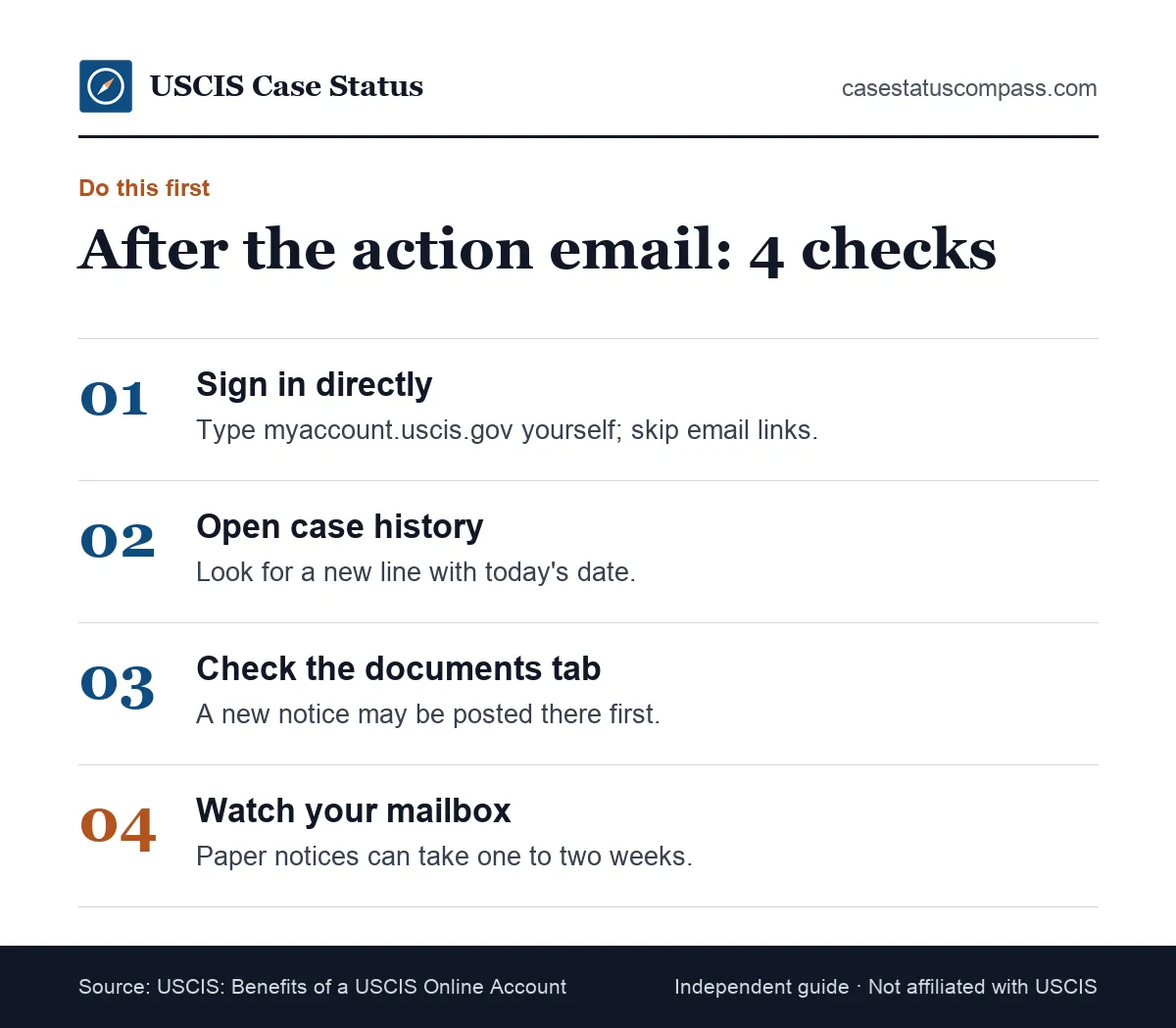
The whole check takes about five minutes.
A short routine for each email
- Note the date the email arrived.
- Sign in at myaccount.uscis.gov/create-account or your usual login page.
- Read the newest history line and document.
- Screenshot what you see.
- Calendar any deadline at once.
What not to do
Do not call the Contact Center the same day; agents usually see what you see. Do not mail unrequested documents, which can create a new correspondence step and slow review.
Decision Table: If You See This, Do This
The decision table below turns common follow-ups into next steps. Find the line that matches your account, then act. Deadlines on USCIS notices are strict, so handle RFEs and appointments first.
Treat the table as a guide, not legal advice.
Next-step decision table
Each row starts from what your account shows after the email and gives the matching step and timing.
| Account shows | Do this | When |
|---|---|---|
| No change | Recheck | 1–3 days |
| RFE or NOID | Note deadline; gather evidence | Same week |
| Appointment notice | Confirm date; prepare | Within days |
| Approval notice | Save it | No rush |
| Denial notice | Get legal advice | Promptly |
| Transfer notice | Note new office | No action |
The rows with a deadline, an RFE or NOID and an appointment notice, are the ones to handle first; the rest can wait.
When the follow-up is a denial
A denial notice explains the reasons and any appeal or motion rights, and deadlines can be short. Read our page on what case was denied means, then speak with an immigration attorney.
How Do You Verify the Email Is Really From USCIS?
To verify an action email, skip its links and sign in by typing the address yourself. If the same update appears in your account or in Case Status Online at Case Status Online: egov.uscis.gov, the email was genuine.
Never sign in through a link.
Check the sender and links
Look at the full sender address, not just the display name; it should end in uscis.gov. Hover over links without clicking, and treat any address outside uscis.gov as a warning sign.
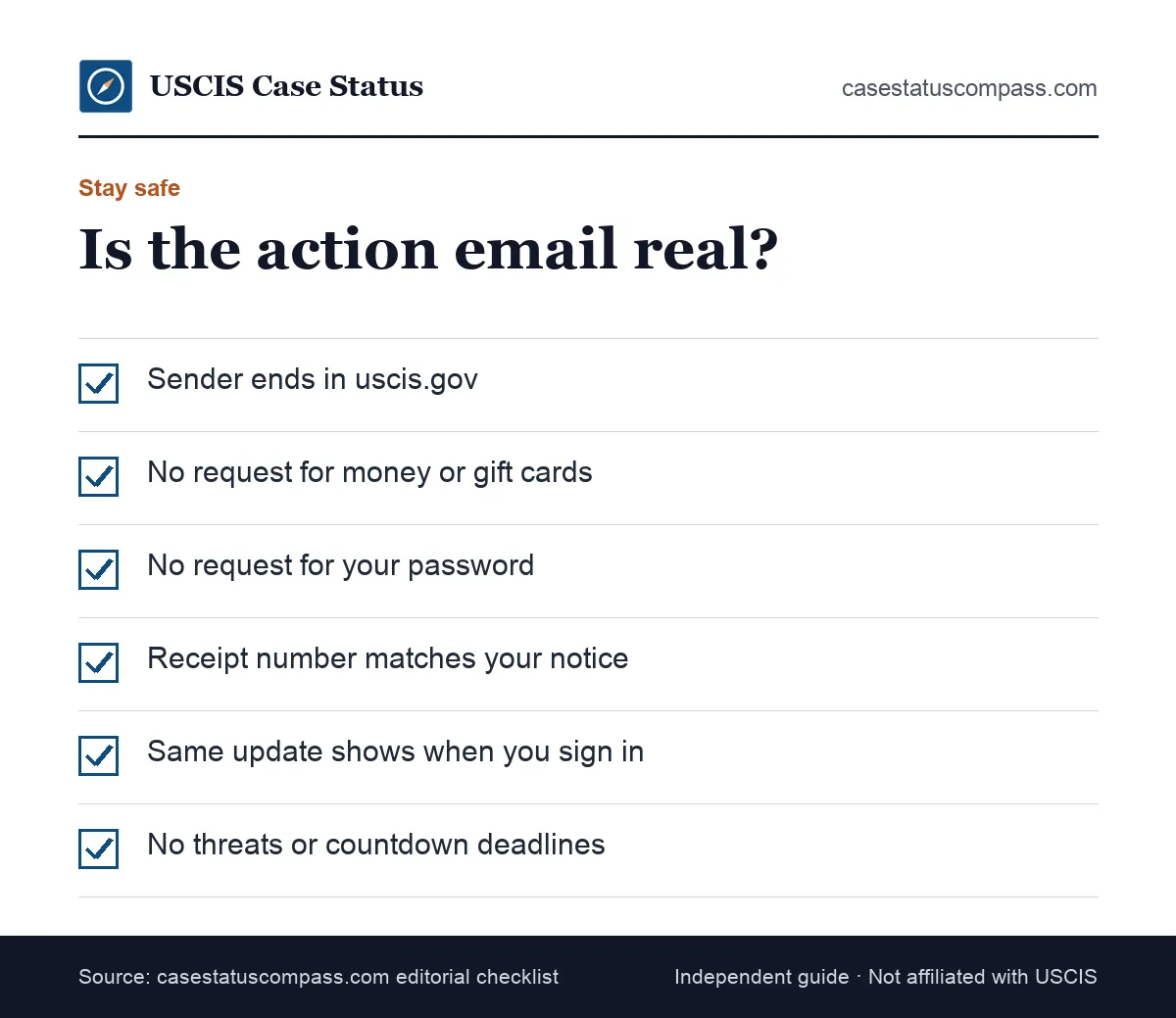
Cross-check with Case Status Online
Enter your receipt number in Case Status Online. The format is 3 letters + 10 digits (13 characters), e.g. EAC2512345678; leave out dashes. If the public tool and your account agree, trust the update; if neither shows anything after a few days, be suspicious.
Signs of a Fake Action Email
A fake USCIS email usually pushes you to pay, share a password or act within hours. Real USCIS emails send you to your account and nothing more. Odd domains and threats of arrest are classic scam signs.
When unsure, delete the message and check your account directly.
Red flags at a glance
- Sender domain is not uscis.gov
- Demands payment by wire, app or gift card
- Asks for your password or a code
- Promises faster approval for a fee
Any one of these is enough to treat the message as a scam.
Where to report a fake email
Report suspicious messages to the Federal Trade Commission, then delete them without replying. Our USCIS scam warning signs guide shows the most common schemes aimed at applicants.
Use ReportFraud.ftc.gov, the FTC's scam reporting site.
What Should You Do If You Clicked a Fake USCIS Email?
Change your USCIS password at once and turn on two-step verification. If you paid, contact your bank. If you shared your Social Security number, consider a credit freeze and report identity theft to the Federal Trade Commission.
Then check your real account.
Can You Turn Case Update Emails On or Off?
As of October 2026, we could not confirm an official uscis.gov page describing email or text case alerts or how to manage them. Check your account settings; every update still posts there.
Mailed notices are not affected by any email setting, so watch your mailbox either way.
Keep your email address current
If you change email address, update your account profile so action emails still reach you. Check spam folders too; applicants report genuine USCIS emails landing there.
Add USCIS to your safe senders.
Changing your mailing address
An email change is not a mailing address change; paper notices still go to the address on file. If you move, our uscis change of address guide explains how.
USCIS says: Update your address online in your USCIS account (E-COA); a mailed AR-11 also counts.
Why You Might Get Several Action Emails in a Row
Several action emails in a row usually mean several internal entries, such as assignment, a security check, an upload and a decision, each with its own email. Bursts often bring only one visible change.
Read the newest notice first, then work back through older entries.
Same day, several emails
Check whether you have more than one receipt number. A combo filing of Forms I-485, I-765 and I-131 can produce an email for each. Match each email to its form before drawing conclusions.
Emails spread across a week
A run of emails over several days usually tracks one case moving through steps: assignment, an upload, then a notice. Read the history line by line; the newest entry matters most.
Action Email After an RFE Response
An action email after an RFE response usually means USCIS logged your reply, and a correspondence status often follows. The officer then decides the case or asks for more, so keep your copy of the response handy.
Do not send more unless asked.
Signs the reply was enough
Applicants often see an approval within weeks of the correspondence status when the reply covered every point. A second RFE suggests a gap; read it closely to see what was missing.
How Do You Confirm USCIS Received Your RFE Reply?
Keep the mailing receipt or upload confirmation. If no update appears within a few weeks, contact USCIS with your tracking details. A lost reply can lead to denial for abandonment, so do not wait.
Online uploads show a confirmation page; save it.
Action Email After Biometrics
An action email after biometrics often means USCIS recorded your fingerprints and photo or reused older ones. It may also mean the case entered the review queue, where an officer picks it up once background results are back.
No step is needed from you.
Security checks after fingerprints
Fingerprints feed the security checks officers need before deciding most cases. Those checks run in the background and rarely produce a status of their own, so a quiet account afterward is normal.
What usually comes next
For N-400 and many I-485 cases, an interview notice may follow. For I-765 and I-131, approval often follows. Watch your account rather than counting days.
Keep your address current so the next notice reaches you.
Can USCIS Reuse Biometrics Without an Appointment?
Yes. USCIS sometimes reuses biometrics from an earlier filing instead of scheduling an appointment, so you may get an action email with no appointment notice at all. Our biometrics appointment guide explains when USCIS skips the visit.
Check your account for a reuse notice.
Action Email After an Interview
An action email after an interview often means the officer recorded the result or moved the case to final review. If you were recommended for approval, the email may mark that entry, or a request for documents.
Keep any paper the officer gave you.
Recommended for approval
For N-400 cases, the next step is usually the oath notice; for I-485 cases, the approval notice and card production. See our interview was scheduled guide for how interview updates read.
Continued for more evidence
If the officer gave you Form N-14 or asked for papers, send exactly what was listed by the date given. A correspondence update usually follows. Keep proof of delivery.
Ask an attorney if a request is unclear.
Action Email for Cases With an Attorney
When an attorney filed your case, the action email may go only to the attorney's account; you may get nothing, or a duplicate if your account is linked. The attorney should tell you what changed.
Ask them to forward every notice.
Questions to ask your attorney
- Did a new notice appear?
- Is there a deadline, and who will meet it?
- Do you need anything from me?
- Can I have a copy of every notice?
Ask them by email so you have the answers in writing and can refer back to them later.
If your attorney goes quiet
If Case Status Online shows a new update and you hear nothing for a week, ask your attorney in writing for a copy of the notice and the next step.
Mistakes to Avoid After an Action Email
The most common mistakes after an action email are panicking, clicking email links, sending unrequested papers and missing a deadline in an unread notice. A calm routine of checking the account and mail prevents them.
The table pairs each one with a fix.
Four mistakes and fixes
The table lists the four slips that cause the most trouble after an action email and the habit that prevents each.
| Mistake | Why it hurts | Fix |
|---|---|---|
| Clicking email links | Phishing risk | Type the address |
| Mailing extra documents | New review steps | Send only what is asked |
| Ignoring the documents tab | Deadlines run from the notice date | Check after every email |
| Calling the same day | Agents see what you see | Wait for a change |
All four fixes come down to one rule: let your account and your notices, not the email, tell you what to do next.
Can You Travel or Change Jobs After an Action Email?
Do not book international travel or quit a job based on an action email. Wait for the approval notice or card, because the same email can precede an RFE or interview that needs you here.
Ask an attorney before any trip abroad.
Advance parole and a pending I-485
With a pending I-485, leaving the U.S. without advance parole can seriously harm your application. Our guide to travel with a pending I-485 explains the risks first.
Carry the approved document when you travel.
What Should Your Action Email Log Include?
Keep a simple case log: the date of each email, a screenshot of your account, every notice, each receipt number and notes from calls. A good log makes an inquiry, expedite request or attorney review faster.
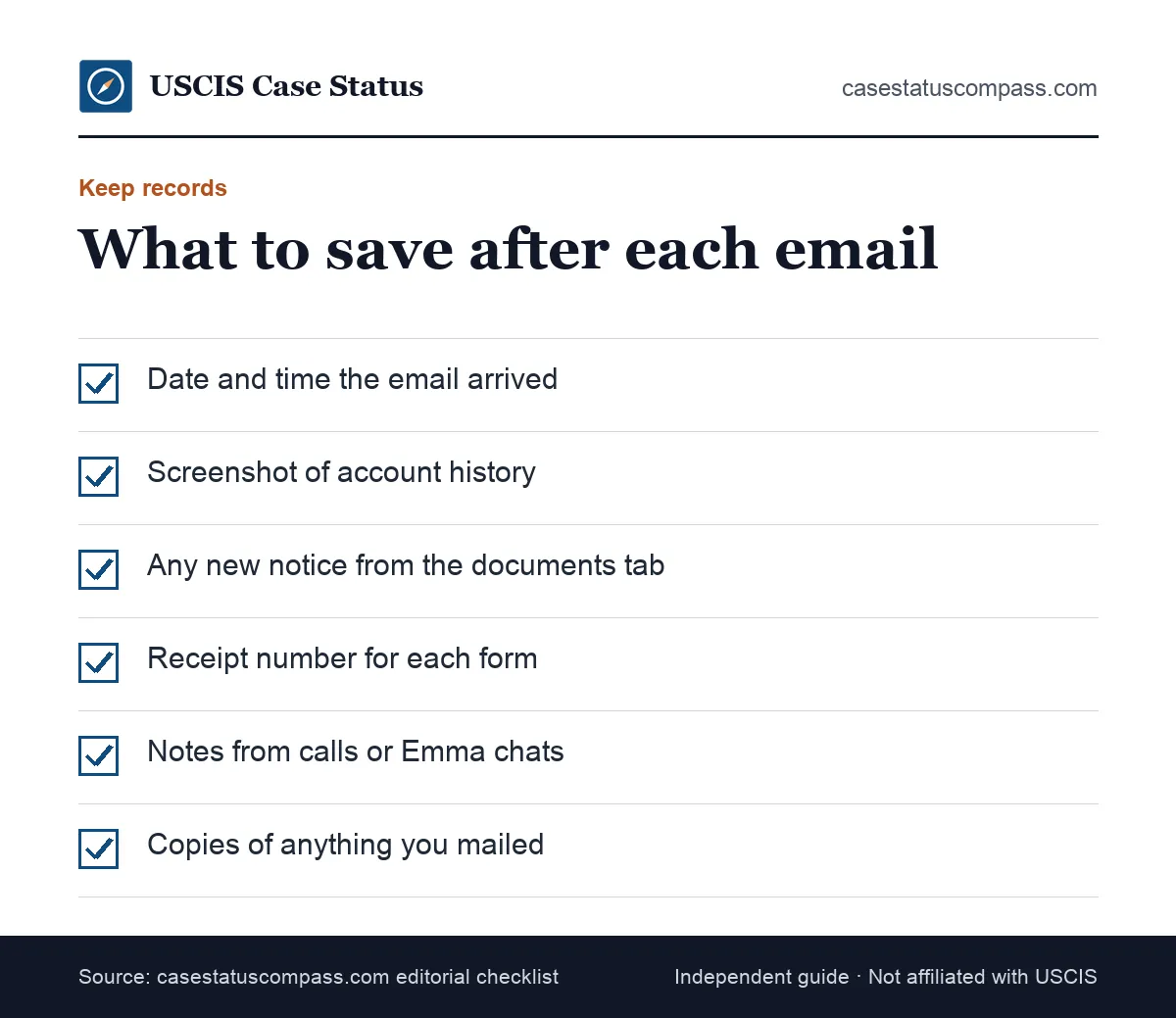
Keep the log open during any call with USCIS so you can quote dates and receipt numbers exactly instead of from memory.
A simple log format
Use one line per event: date, form, receipt number, what changed and what you did. Store notice PDFs in one backed-up folder named by form.
Update it the same day each email arrives.
Notices worth keeping forever
Keep every receipt, approval and card notice after the case closes. I-797C = Notice of Action (receipt, rejection, transfer, appointment, re-open); not proof of status by itself. Our Form I-797C notice of action guide explains each part.
When Should You Contact USCIS After the Email?
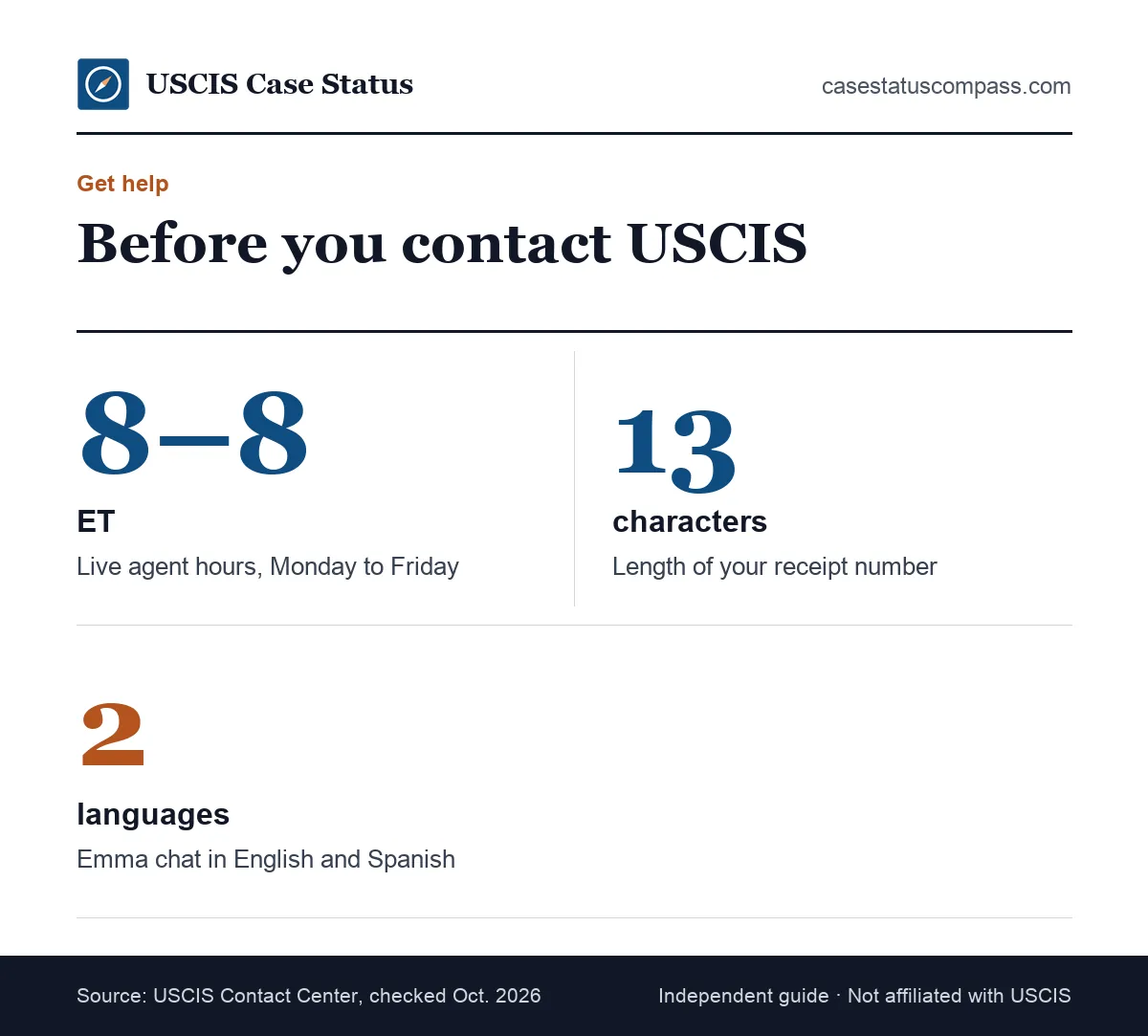
Contact USCIS if your case is outside the posted processing time, a notice never arrived, or your account still shows nothing a week after the email. A single action email with no visible change is not a reason to call.
Phone, chat and appointments
Call 800-375-5283 (TTY: 800-767-1833). Live calls and chat: Monday to Friday, 8 a.m. to 8 p.m. Eastern. You can also try Emma, USCIS's online virtual assistant (English and Spanish), on uscis.gov. Request an in-person appointment online at my.uscis.gov/en/appointment/v2 or call 800-375-5283. Our uscis contact number guide explains which channel fits which problem.
Escalation options
If normal inquiries fail, ask for an expedite when you meet USCIS criteria, or contact the CIS Ombudsman or your member of Congress. See the uscis expedite request and uscis ombudsman and congressional inquiry guides.
When to Talk to an Immigration Attorney
Talk to an immigration attorney or accredited representative if the email leads to an RFE you do not understand, a NOID, a denial, or a request tied to criminal history or past status problems.
Getting advice early often costs less than fixing a missed deadline later.
Situations where advice pays off
- A deadline you cannot meet
- An RFE about arrests, fraud or prior violations
- A NOID or denial notice
- Links to court or removal proceedings
In each one, a wrong step can hurt the case, so get advice before replying.
Finding low-cost help
The Department of Justice lists accredited representatives at recognized nonprofits, many offering low-cost help. A "notario" is not a legal credential in the U.S., so check that anyone you hire is licensed or accredited.
Case Status Online vs Your Online Account
Case Status Online shows the latest public status for one receipt number. The online account shows history, notices and myProgress for linked cases. After an action email, the account is the better place to look first.
Use both to confirm each other.
Side-by-side
The table compares the free public tool and the USCIS online account feature by feature.
| Feature | Case Status Online | Online account |
|---|---|---|
| Login needed | No | Yes |
| Full history | No, latest status only | Yes |
| Shows notices | No | Most notices |
| myProgress estimate | No | Certain forms |
| Triggers action emails | No | Yes |
For a paper filer without a linked account, Case Status Online is the only view, which is a good reason to link the case.
Your account number
Your account has a USCIS Online Account Number, which is not a receipt number. USCIS Online Account Number (OAN): only if you have an IOE receipt; shown in your account profile or at the top of the Account Access Notice. Our guide to the uscis online account number explains where to find it.
Can the Email Mean a Denial?
Yes, but a denial is only one of many possible actions. The action email looks the same whether the case was approved, denied or simply reviewed; the notice that follows tells you which.
Open the documents tab before you assume the worst.
How a denial would show
A denial shows as a "Case Was Denied" status plus a written decision with reasons. If you see only the email and no new status, the action was almost certainly something else.
How an RFE would show
An RFE shows as a request-for-evidence status and a notice listing what to send and by when. It is not a denial, but missing its deadline can lead to one.
How an approval would show
An approval shows as a "Case Was Approved" status and an approval notice. Our guide to the approval case decision rendered status explains what to check next, including typos.
Three Action Email Scenarios
These scenarios show how the same email plays out in different cases. They are composites of reported patterns, not real people.
Each shows one possible follow-up, from card production to an RFE, an interview notice or a transfer, and the step the applicant took. Find the case closest to your own form and compare the next update you see.
Scenario: work permit renewal
Maria filed Form I-765 to renew her EAD. Three months later, the action email arrived with no visible change; two days later, her status showed card production.
She needed to do nothing but watch her mail for the new card.
Scenario: green card with an RFE
Ahmed's I-485 had cleared biometrics. After an action email, an RFE for a new medical exam appeared in his documents tab the next morning. He sent the sealed I-693 and saw "correspondence received" two weeks later.
Scenario: citizenship scheduling
Lin filed Form N-400 and got an action email with no change. A week later, an interview notice appeared, and the letter followed. She used the gap to gather tax records and travel history.
Scenario: family petition transfer
Priya's I-130 brought an action email, then a transfer notice the next day. Her receipt number stayed the same, and she kept tracking it while the new office reviewed the petition.
Frequently Asked Questions
Is the "we have taken an action" email an approval?
No. The email only says USCIS made an entry on your file, and it looks the same for approvals, evidence requests and internal steps. An approval shows up as a "Case Was Approved" status and an approval notice.
Why did I get the email but my status did not change?
The action was probably internal, such as officer assignment or a security check, which often creates no public status. Updates can also take days to appear. Check the documents tab the next day.
Can USCIS take an action without telling me?
Yes. Many internal steps never trigger an email or a public status, and emails depend partly on whether your case is linked to an online account. Mailed notices remain the official record of any action that affects you.
Should I call USCIS after the action email?
Usually not right away; agents generally see what you see online. Call if a notice never arrived, a deadline is unclear, or your case is outside the posted processing time.
Does the action email mean my interview was waived?
No. The email says nothing about interviews, and even a completed step 3 in myProgress does not confirm a waiver. Only an approval without an interview, or a USCIS notice saying none is needed, confirms it.
How long does it take to see the notice after the email?
When a notice exists, it often appears in the documents tab within a few days, and the paper copy usually follows within about one to two weeks. Internal actions produce no notice.
What if I get the email for a case I did not file?
Check the receipt number and form type in your account; it may be a family member's linked case or an employer petition naming you. If you cannot match it to any filing, sign in directly and contact USCIS.
Can I get the action email after my case was approved?
Yes. After an approval, USCIS may still record card production, mailing or a notice upload, and each can trigger an email. Check the documents tab and watch for card updates.
Does the action email mean my case was transferred?
Sometimes, but a transfer usually brings its own status and a notice naming the new office. If neither appears within a few days, the action was probably something else.
Do I need to pay anything after the action email?
No. The action email never asks for payment. If a message tied to it demands a fee, gift card or wire, treat it as a scam and sign in to your account directly.
Sources
- USCIS: Checking Your Case Status Online. www.uscis.gov/tools/checking-your-case-status-online. Accessed Oct 27, 2026.
- USCIS: Benefits of a USCIS Online Account. www.uscis.gov/file-online/benefits-of-a-uscis-online-account. Accessed Oct 27, 2026.
- USCIS: Form I-797 Types and Functions. www.uscis.gov/forms/filing-guidance/form-i-797-types-and-functions. Accessed Oct 27, 2026.
- USCIS alert: USCIS Expands myProgress to Form I-485 and Form I-821 (Nov. 21, 2023). www.uscis.gov/newsroom/alerts/uscis-expands-myprogress-to-form-i-485-and-form-i-821. Accessed Oct 27, 2026.
- USCIS Contact Center. www.uscis.gov/contactcenter. Accessed Oct 27, 2026.
- USCIS Check Case Processing Times. egov.uscis.gov/processing-times/. Accessed Oct 27, 2026.
- USCIS: Form I-485 page (updated 10/07/2026). www.uscis.gov/i-485. Accessed Oct 27, 2026.
- USCIS: Automatic EAD Extension (updated 10/29/2025). www.uscis.gov/working-in-the-united-states/information-for-employers-and-employees/automatic-employment-authorization-document-ead-extension. Accessed Oct 27, 2026.
- USCIS: Removing Conditions on Permanent Residence Based on Marriage (updated 12/12/2023). www.uscis.gov/green-card/after-we-grant-your-green-card/conditional-permanent-residence/removing-conditions-on-permanent-residence-based-on-marriage. Accessed Oct 27, 2026.
- USCIS: Replace Your Green Card (updated 09/12/2025). www.uscis.gov/green-card/after-we-grant-your-green-card/replace-your-green-card. Accessed Oct 27, 2026.
- USCIS: Online Account and Technical Support. www.uscis.gov/tools/uscis-tools-and-resources/online-account-and-technical-support. Accessed Oct 27, 2026.
- FTC: How To Avoid Immigration Scams and Get Real Help (Nov. 2023); USCIS Report Immigration Scams page. consumer.ftc.gov/articles/how-avoid-immigration-scams-and-get-real-help. Accessed Oct 27, 2026.
- USCIS: How to Change Your Address (updated 08/04/2026). www.uscis.gov/addresschange. Accessed Oct 27, 2026.
- Form N-400 Instructions (USCIS). www.uscis.gov/sites/default/files/document/forms/n-400instr.pdf. Accessed Oct 27, 2026.
casestatuscompass.com is an independent publication and is not affiliated with USCIS or any government agency. This page is general information, not legal advice. For denials, court or asylum matters, consult an immigration attorney or a DOJ-accredited representative.