Contents · 37 sections
- What Do USCIS Case Status Meanings Tell You?
- How Do USCIS Case Statuses Work?
- Where Do You See Your Status Message?
- The Whole Case Lifecycle in Four Stages
- Master Table: Every Common Status at a Glance
- Early Stage Statuses
- What Does the Biometrics Stage Look Like in Your Status?
- Review Stage Statuses
- Is "Actively Reviewed" a Sign of Approval?
- What Do Evidence-Request Statuses Mean?
- What Does an Interview Status Mean for Your Timeline?
- Why Do Cases Get Transferred?
- Decision Stage Statuses
- What Is the Difference Between Approved, Denied and Rejected?
- What Happens After an Approval Status?
- Card and Delivery Statuses
- Other Updates
- What Do Less Common Status Messages Mean?
- Can a USCIS Case Status Go Backwards?
- Why Did the Date Change but the Message Stay the Same?
- Why Can a Status Stay the Same for Months?
- How Long Does Each Stage Usually Take?
- USCIS Case Status Meanings for Form I-485
- USCIS Case Status Meanings for Work Permits
- Status Messages for Petitions: I-130 and I-140
- Status Messages for Naturalization (Form N-400)
- Status Messages for Card Renewals and Conditions
- Which Statuses Need Action From You?
- Which Statuses Mean You Should Simply Wait?
- How USCIS Case Status Meanings Fit Together
- Online Status or Paper Notice: Which Should You Trust?
- What Should You Do When Your Status Is Not Updating?
- Common Misreadings of Status Messages
- Statuses That Mean Another Agency Takes Over
- Keeping a Status Log for Your Case
- When Should Your Status Prompt Legal Help?
- Frequently Asked Questions
The short answer
USCIS case status meanings are short labels for the last action recorded on your filing. Received and biometrics messages mean intake; actively reviewed, RFE and interview messages mean review; approved or denied is the decision; card messages track delivery. Only an approval or denial notice is a decision.
At a glance
| Where statuses appear | Case Status Online: egov.uscis.gov and your USCIS online account |
| Stages | Intake, review, decision, card delivery |
| Is any status a decision? | Only Approved, Denied or a rejection |
| Official record | The Form I-797 notice, not the online label |
| Who runs this guide | An independent site; we are not USCIS |
What Do USCIS Case Status Meanings Tell You?
USCIS case status meanings tell you which step your filing reached most recently and, often, which notice was mailed. They do not predict the outcome. Read each status as a dated note in your file: "this happened on this day." The paragraph under the title adds the detail.
The title versus the paragraph underneath
The bold title, such as Case Was Received, is only a category. The status paragraph below names the form, the action date and often the notice sent. Read the paragraph first: it tells you which receipt number the update belongs to, which matters when several applications are pending together.
A status is a step, not a verdict
Nearly every message describes progress, not a result. Approved and Denied are the only labels that carry a decision on the merits, and a mailed notice confirms both. Any intake or review message simply means your case is still in line.
How Do USCIS Case Statuses Work?
USCIS case statuses work as an event log. When staff or a system records an action, such as receipt, fingerprinting or a decision, the public label changes to match. Nothing changes on a timer, so quiet stretches are normal.
Who changes the status
Some updates are automatic, such as a new receipt or a card leaving production. Others appear when an officer records a step. A status update can post at night or on weekends, as entries load in batches.
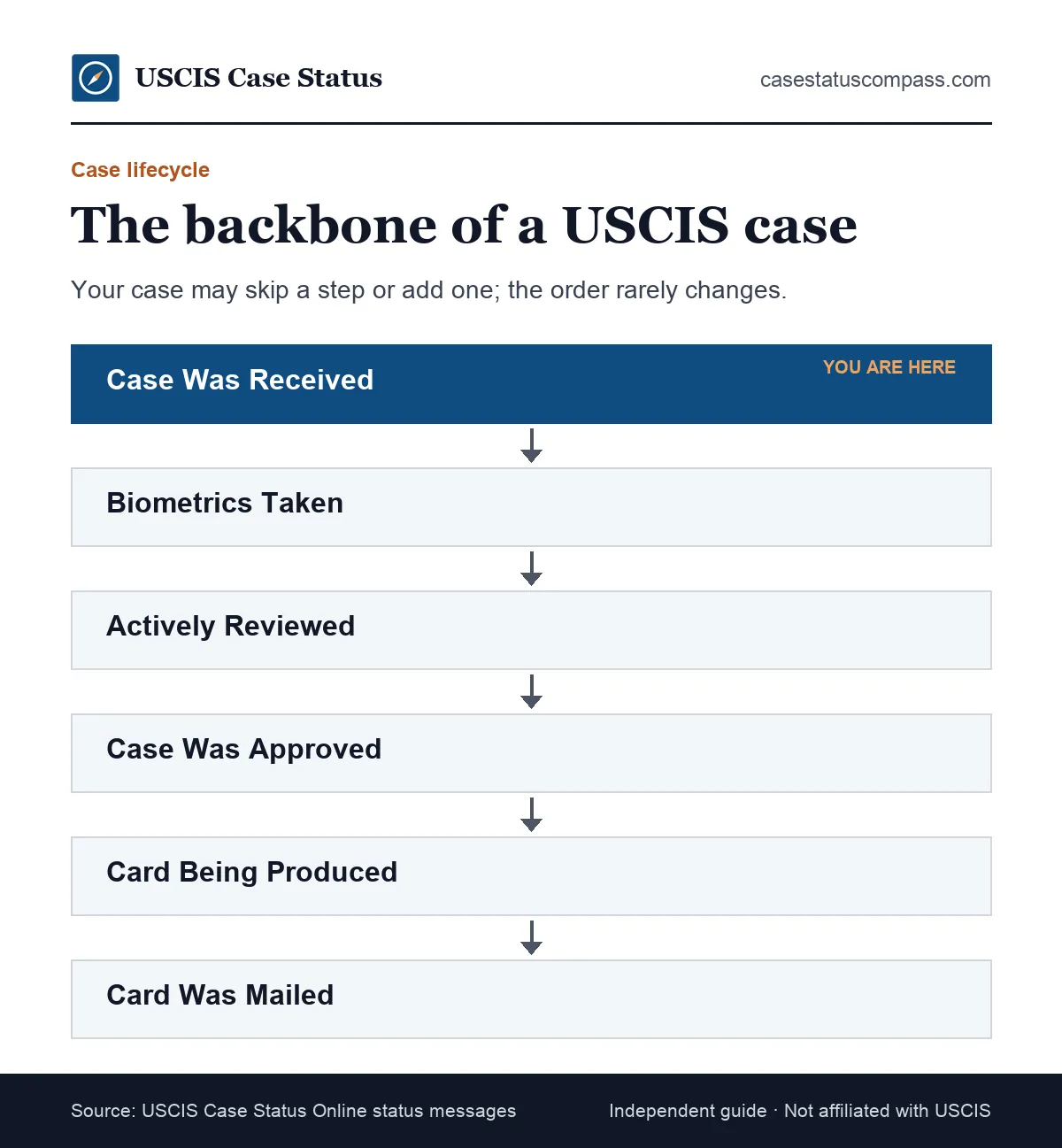
The typical order of statuses for most cases
- Case Was Received and a Receipt Notice Was Sent
- Fingerprint Fee Was Received, then biometrics taken
- Case Is Being Actively Reviewed, sometimes with an RFE or interview
- Case Was Approved (or Denied)
- New Card Is Being Produced, then Card Was Mailed To Me
Where Do You See Your Status Message?
You see your status in two official places: the public Case Status Online search and your USCIS online account. Both read the same USCIS records. The account adds history and digital notices, while the public search shows only the latest entry for one receipt number.
Public search versus your account
The public tool needs only a receipt number. The account offers more: Free USCIS online account: case status updates, notices, link paper-filed cases. Our main uscis case status page walks through both lookup methods step by step.
The Whole Case Lifecycle in Four Stages
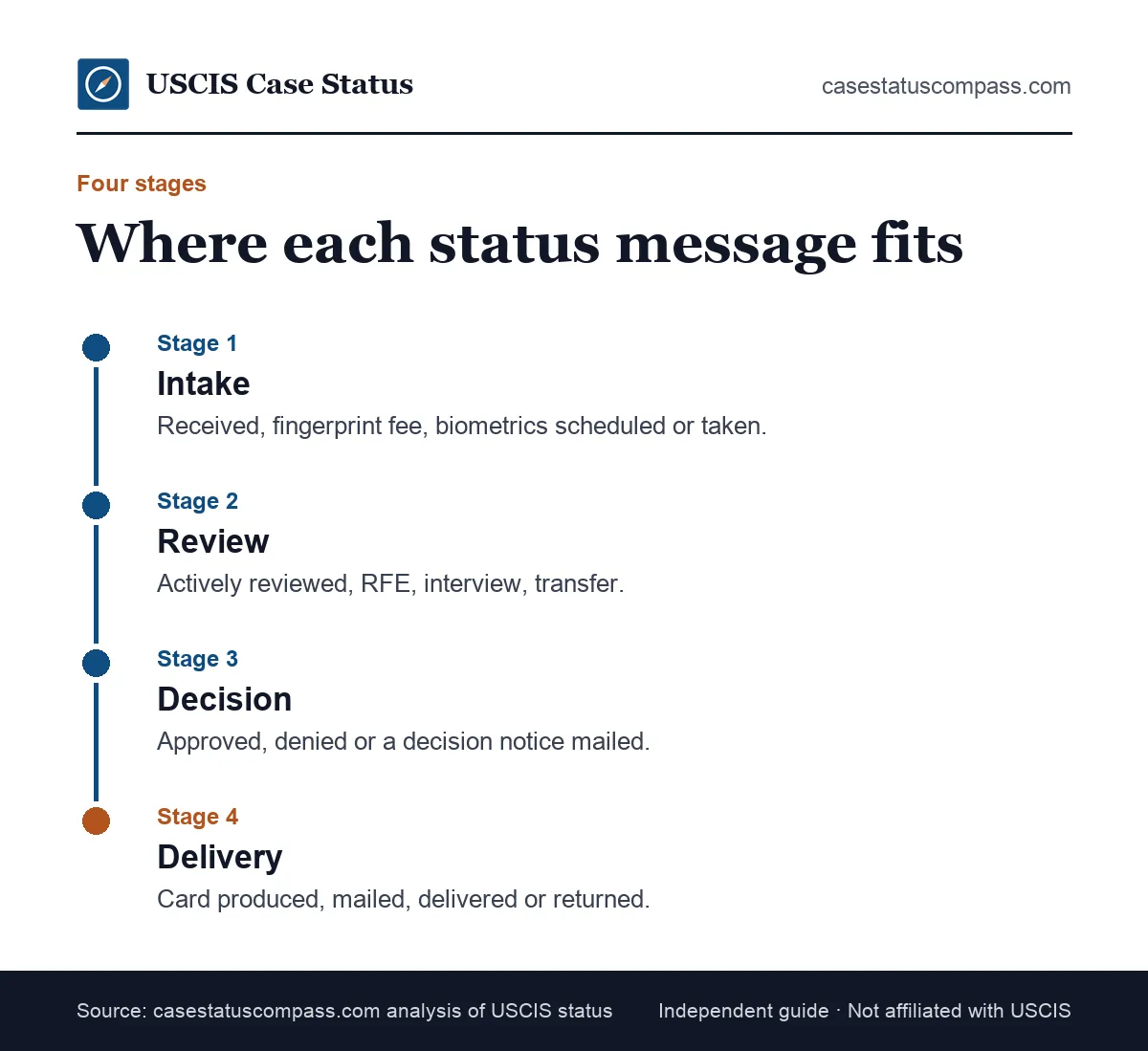
A USCIS case moves through four stages: intake, review, decision and delivery. Every status message belongs to one of them. Knowing the stage tells you more than the label alone, because it shows what already happened and what kind of message comes next.
Stage 1: Intake
Intake covers acceptance of your package, the new receipt number, and fingerprints if your form needs them. These messages confirm your filing exists in the system. They say nothing yet about whether you qualify.
Stage 2: Review
An officer examines your evidence and runs background checks. This stage can include a request for evidence (RFE), an interview or a transfer. It is usually the longest stage and has the fewest visible updates.
Stage 3: Decision
USCIS approves or denies the request and mails a written notice. For forms that produce no card, such as a family petition, this is the last USCIS status you will see.
Stage 4: Delivery
Delivery applies to forms that produce a document, such as a green card or Employment Authorization Document (EAD). The status follows the card from printing to mailing and, sometimes, back to USCIS.
Master Table: Every Common Status at a Glance
This master table lists the common USCIS case status meanings in order, with the stage of each and the status that usually follows. Use it to place your current message, then open the linked guide for the full explanation of that one status.
Status, stage and next status in order
Read each row left to right: the label you see, the stage it belongs to, what it means and the update that usually follows it.
| Status message | Stage | Meaning | Typical next status |
|---|---|---|---|
| Case Was Received | Intake | Receipt number issued | Biometrics notice |
| Fingerprint Fee Was Received | Intake | Biometrics to be booked | Appointment notice |
| Fingerprints Were Taken | Intake | Biometrics done | Actively reviewed |
| Case Is Still Being Processed | Intake / Review | Pending, nothing new | Review or decision |
| Case Is Being Actively Reviewed | Review | In an officer's queue | Approval, RFE or interview |
| Request for Evidence Was Sent | Review | Documents needed | RFE response received |
| Interview Was Scheduled | Review | Date set at field office | Decision |
| Case Was Transferred | Review | New office has the file | Review resumes |
| Case Was Approved | Decision | Request granted | Card produced, or none |
| Case Was Denied | Decision | Request refused | None; read the notice |
| New Card Is Being Produced | Delivery | Card printing | Card mailed |
| Card Was Mailed To Me | Delivery | Card left USCIS | Delivered by USPS |
| Card Was Returned to USCIS | Delivery | Undeliverable | Re-mailed after address fix |
How to read the master table
Find the row that matches your title, then look right. The typical next status is the most common follow-up, not a promise. A case can skip a row, such as jumping from received to approval, or repeat one after a transfer.
Early Stage Statuses
Early stage statuses confirm that USCIS has your filing and is gathering what it needs before review. They include the receipt message, fingerprint and biometrics updates, and the general "still being processed" label. None is a decision, and none signals a problem on its own.
Case Was Received
This is the first message most filers see, usually within a few weeks. It means a receipt number exists and a Form I-797C receipt notice is on its way. Our full guide explains what "case was received" means and what to check on the notice.
Case Is Still Being Processed
This holding message often appears after intake while the file waits for its next step. Nothing is wrong and nothing new has happened. Our page on case is still being processed by USCIS explains when it is routine.
Fingerprint fee received / biometrics scheduled
These messages show that USCIS will book, or has booked, a session at an Application Support Center. Fees for this step are now mostly built in: Biometrics included in most fees (separate $30 for TPS I-821 and some EOIR forms). The notice gives the date and place.
What Does the Biometrics Stage Look Like in Your Status?
The biometrics stage usually shows as two or three messages: a fingerprint fee or scheduling update, then a note that fingerprints were taken. Some cases show only one. The appointment notice matters more than the label, because it carries your date, time and location.
When biometrics messages appear
They normally follow the receipt within weeks, though timing varies by office. Forms filed together often share one appointment. Our biometrics appointment guide explains what to bring and how to reschedule.
When no biometrics message appears
Not every form needs fingerprints, and USCIS can reuse biometrics from an earlier case. If your form normally needs them and nothing comes after a long wait, check your account documents first.
Review Stage Statuses
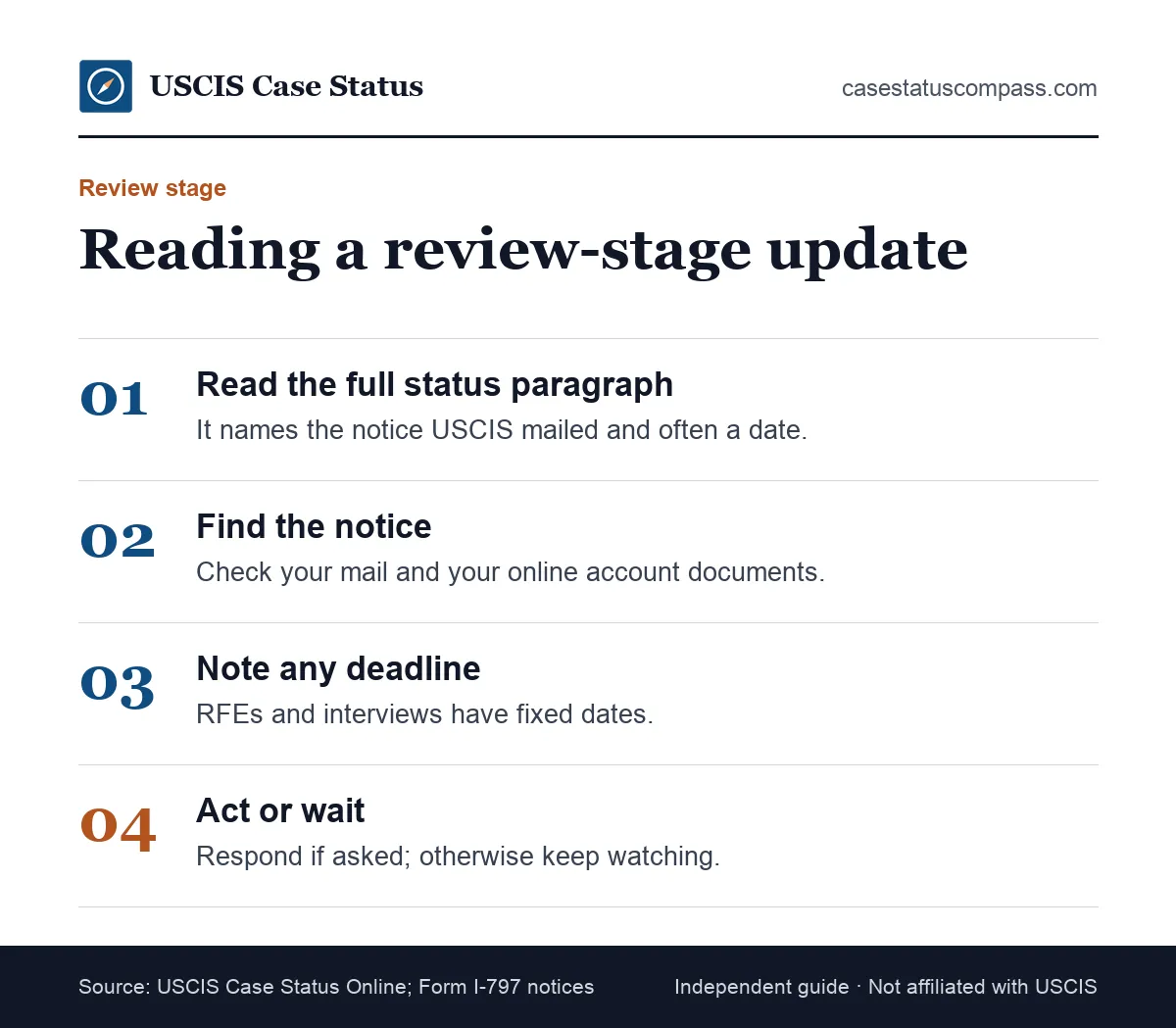
Review stage statuses show that an officer is examining your case or that USCIS needs something before it can decide. They include active review, evidence requests, interview scheduling and transfers. Each one comes with a notice or is followed by one, so watch your mail.
Case Is Being Actively Reviewed
The file has reached an officer's queue or is being worked on. It can appear more than once and does not promise a quick result. Read our guide to case is being actively reviewed by USCIS for what it usually leads to.
Request for Evidence Was Sent
The officer cannot decide with what you sent. The notice lists missing items and a firm deadline. Our request for evidence guide explains how to answer completely. The due date is printed on the RFE itself, never in the online status.
Interview Was Scheduled
USCIS has set a date for you to appear at a field office, which is common for green card and citizenship cases. Our page on the interview was scheduled message explains where it falls in your timeline.
Case Was Transferred
Another USCIS office now owns your file, often to share workload or interview you closer to home. It is rarely a problem. The page on case was transferred explains what changes.
Is "Actively Reviewed" a Sign of Approval?
No. "Actively Reviewed" means your file is in an officer's hands or queue, not that a decision is close. Cases can sit in this status for months, return to it after an RFE response, or move straight to approval. Treat it as neutral progress, not a forecast.
Why it can appear more than once
The label is reused whenever review resumes, such as after an RFE reply, an interview or a transfer. A repeat does not mean your case restarted. It means a new round of work began on the same file.
What Do Evidence-Request Statuses Mean?
Evidence-request statuses mean USCIS paused its decision to ask for more proof, or confirmed that your reply arrived. The first message starts a deadline; the second restarts review. Neither is a denial, but ignoring a request almost always leads to one.
Request for Additional Evidence Was Sent
This label starts the clock. Answer every listed item in one package, in the order the notice uses, and keep a full copy. There are no extensions, and a partial reply can lead USCIS to decide on the record.
Response to USCIS' Request for Evidence Was Received
This confirms your package arrived, and review resumes. It does not mean the response was enough. USCIS can still send a further notice before it decides. Keep your delivery proof.
Notice of Intent to Deny
A Notice of Intent to Deny (NOID) is more serious than an RFE: USCIS found a reason to deny and gives you one chance to answer. Read our notice of intent to deny explainer and consider legal help.
What Does an Interview Status Mean for Your Timeline?
An interview status usually means your case is near the end of review. For green card and naturalization cases, the interview is often the last major step before a decision. Some cases are decided at the interview; others go back for more review afterwards.
Ready to be scheduled versus scheduled
"Case Is Ready to Be Scheduled for an Interview" means the file waits for an open slot. "Interview Was Scheduled" means a date exists. The gap depends on the office calendar, which calling cannot speed up.
After the interview
A common follow-up is "Interview Was Completed and My Case Must Be Reviewed", meaning the officer needs more time or a sign-off. Our uscis interview hub covers preparation for each interview type.
Why Do Cases Get Transferred?
USCIS transfers cases to balance workloads, to move a file to the field office that will interview you, or to send it to a specialized unit. A transfer changes who holds the file, not the rules that apply. Your receipt number stays the same throughout.
What a transfer changes
The new office sends future notices and sets any interview. Timing can shift, because each office has its own queue, so check the posted time for the new office. Our page on USCIS service centers explains how offices divide the work.
Decision Stage Statuses
Decision stage statuses tell you that USCIS finished its review and approved or denied your request. They are the only messages that settle the outcome. A written notice always follows, and that notice, not the online label, is your official proof of the decision.
Case Was Approved / Decision Rendered
USCIS granted the request. What follows depends on the form: a card, a travel document, an oath ceremony or nothing further. See our guide to approval case decision rendered messages for next steps by form.
Case Was Denied or Rejected
A denial means USCIS reviewed and refused your case; a rejection means it was never reviewed. Denial notices list any appeal or motion options. Our page on what case was denied means covers the status itself.
What Is the Difference Between Approved, Denied and Rejected?
Approved means USCIS granted your request after review. Denied means it refused the request after review and must explain why. Rejected means the package failed intake checks and came back unreviewed. Usually only a denial carries appeal or motion rights.
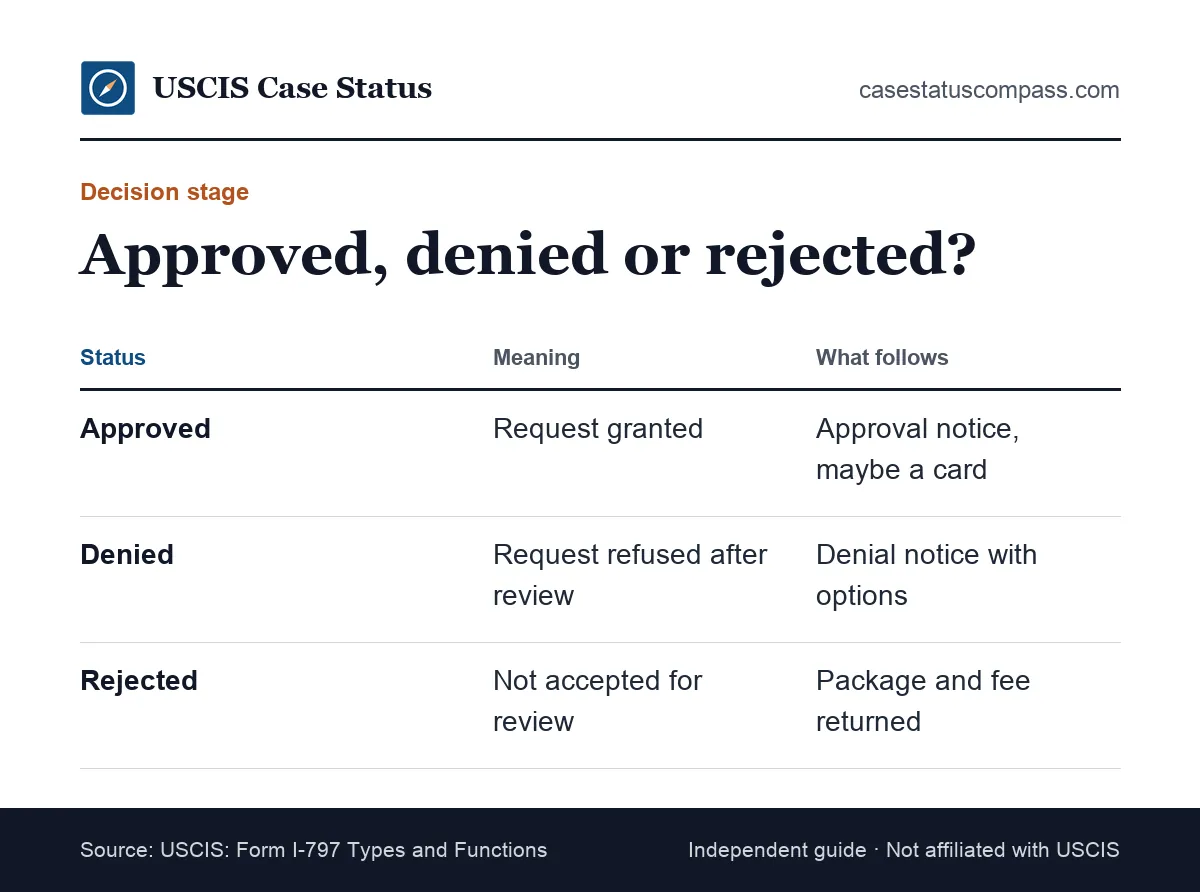
| Approved | Denied | Rejected | |
|---|---|---|---|
| Case reviewed? | Yes | Yes | No |
| Notice | Approval notice | Denial with reasons | Rejection notice |
| Next move | Wait for card or next step | Read options, get advice | Correct and refile |
| Receipt date kept? | Not relevant | Not relevant | No; refiling gets a new date |
Which outcome needs fast action
A denial needs the fastest response, because deadlines run from the notice date. Our case denied guide walks through the choices. A rejection is urgent only if a filing deadline applies, such as an expiring status.
What Happens After an Approval Status?
After an approval status, USCIS mails an approval notice. If your form produces a card, delivery statuses follow, often within days or weeks. If it does not, such as a family or employment petition, the approval is the final USCIS update and the next step may happen elsewhere.
Forms that produce a card
Green card, work permit and replacement card cases move to production and mailing messages. Make sure USCIS has your current address before the card prints; our change of address guide explains how.
Forms that end with a notice
Petitions such as Form I-130 and Form I-140 end with an approval notice. For a relative or worker abroad, the file then goes to the National Visa Center (NVC). Our NVC case status guide covers that phase.
Card and Delivery Statuses
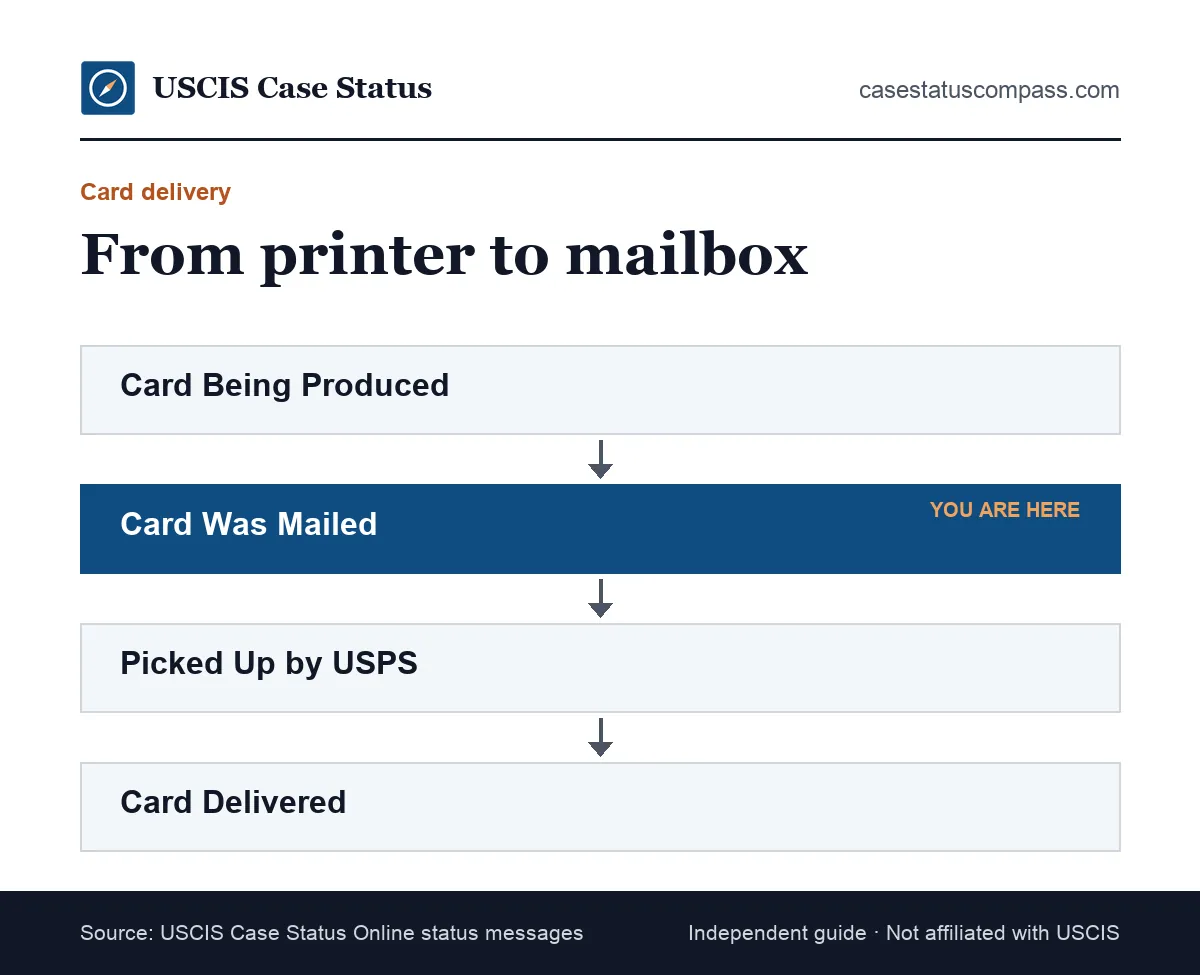
Card and delivery statuses track the physical document after approval. They show when printing starts, when the card leaves USCIS, when the post office handles it and whether it came back. These messages matter for green cards, work permits and replacement cards.
New Card Is Being Produced
The card is in the print queue. For some work permit cases, this is the first sign of approval. Our guide on what new card is being produced means explains the usual gap before mailing.
Card Was Mailed / Delivered
The card left USCIS, often with a USPS tracking number. Later labels may show pickup or delivery. Our page on the card was mailed to me status explains tracking and missing cards.
Card Was Returned to USCIS
The post office could not deliver the card, usually because of an address problem, and USCIS holds it. Read our guide on a card was returned to USCIS to get it re-sent.
Other Updates
Other updates are messages outside the main stages, such as a general "action taken" notice or confirmation that USCIS received your letter or documents. They usually mean a notice is on the way. Wait for that notice before drawing any conclusion about your case.
We Have Taken an Action on Your Case
This vague message often appears when USCIS sends a notice with no specific label of its own. The notice holds the detail. Our page on we have taken an action on your case lists the usual reasons.
Correspondence Was Received
USCIS received something you sent, such as an RFE reply or a letter, and is reviewing it. The label does not show whether the item was accepted, so keep proof of mailing for every package.
What Do Less Common Status Messages Mean?
Less common status messages record single actions such as a corrected name, a reopened case, a withdrawal or a duplicate notice. They follow the same rule as the main labels: one message, one action. Most need nothing from you except checking the related notice for accuracy.
Record corrections
Messages about an updated name or date of birth confirm a record correction. Check the next notice or card to make sure the fix appears. If the error is still there, report it through USCIS e-Request rather than filing a new form.
Reopened, withdrawn or closed
A reopened case gets a fresh look, often after a motion. A withdrawal acknowledgement confirms you asked to stop. An administrative closure can follow a missed appointment. Read the notice and seek advice if you did not expect it.
Can a USCIS Case Status Go Backwards?
A USCIS case status can appear to go backwards when a new action reuses an older label. After an RFE reply or a transfer, a case can show "actively reviewed" again, or "received" for new correspondence. This rarely means the case restarted from the beginning.
Common reasons for a step back
- A document arrived and was logged as a new receipt
- A transfer reset the office queue
- A system update relabeled an older entry
- A supervisor sent the file back for review
When a step back matters
A move from approved back to review is unusual and may mean the decision was reopened. Check your account history and mail, and contact USCIS if no notice explains it within a few weeks.
Why Did the Date Change but the Message Stay the Same?
The date can change while the message stays the same because USCIS logged a new action that uses the same label. Examples include a reissued notice, an internal file update or a corrected entry. A date-only change with identical wording is usually routine.
Typical causes of a date-only change
USCIS may reissue a notice, scan new papers into the file or record an internal step. None of these changes your place in line. If the date moves but the title stays the same, look in your online account for a new notice before assuming anything happened.
What to check
Look at your account history for a new entry and check your mail for a duplicate notice. If neither shows anything, note the new date in your records and keep waiting.
Why Can a Status Stay the Same for Months?
A status can stay the same for months because USCIS records only visible actions, and most review work happens without a new label. Officers can check records, wait for background check results or hold a file for an interview slot without changing what you see.
Silent work behind an unchanged label
Security checks, file requests from other offices and supervisor reviews leave no public trace. A long pause between biometrics and a decision is especially common, so compare your case age with the posted time instead of refreshing daily.
When silence becomes a problem
Silence is a concern once your case is older than the posted time for your form and office. Our guide to a uscis case status not updating explains each escalation step in order.
How Long Does Each Stage Usually Take?
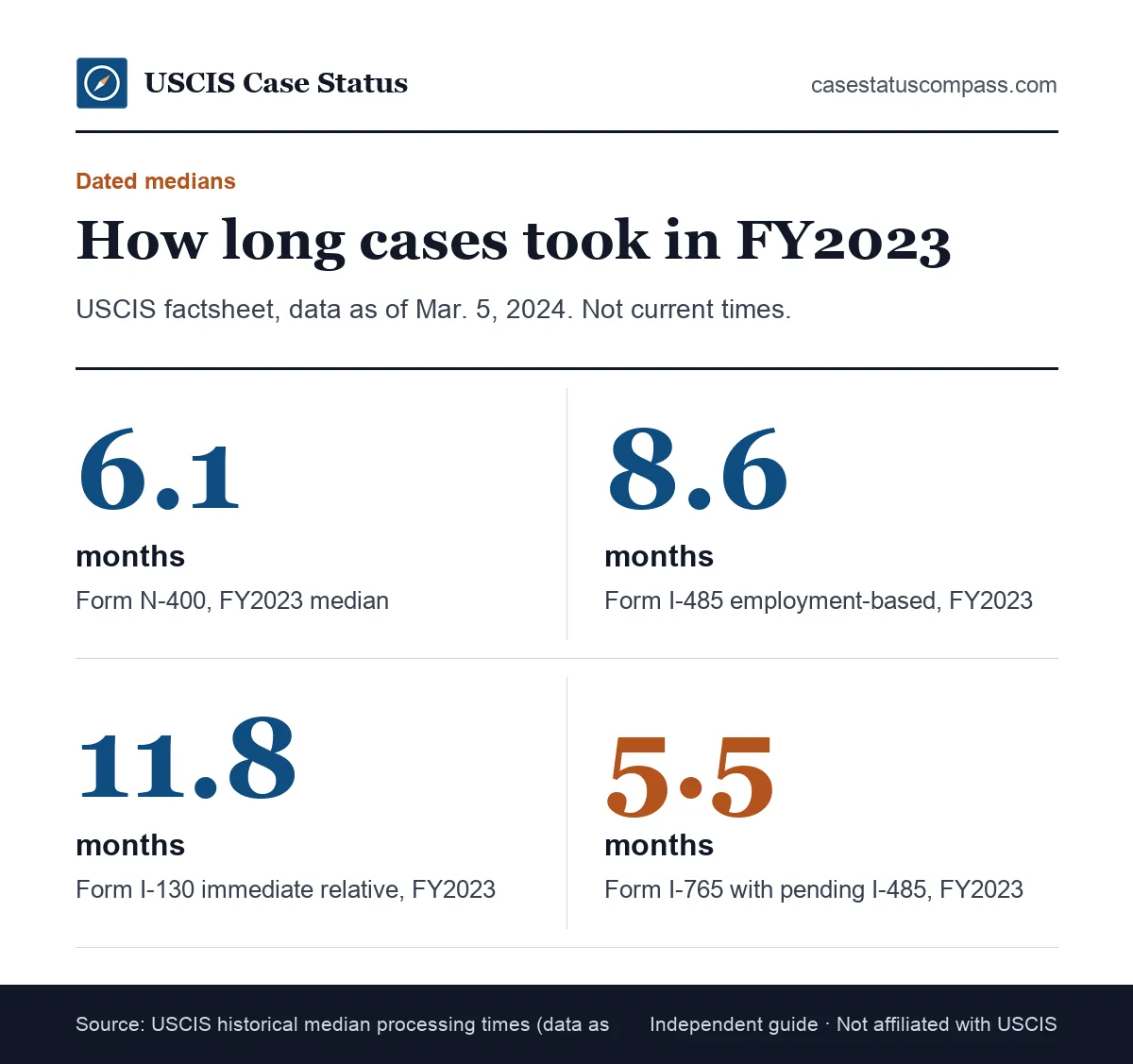
Each stage takes a different amount of time depending on the form, category and office. USCIS publishes current estimates in its official tool at egov.uscis.gov/processing-times. Older national medians give a rough sense of scale, but they are not current times.
Dated national medians
A USCIS factsheet with data as of March 5, 2024 lists FY2023 medians of 6.1 months for Form N-400, 8.6 months for employment-based Form I-485 and 11.8 months for immediate-relative Form I-130. These historical medians cover whole cases, not single stages.
Finding current times
Enter your form, category and office in the official tool, then compare its figure with your receipt date. Our uscis processing times hub explains how to read the results.
USCIS Case Status Meanings for Form I-485
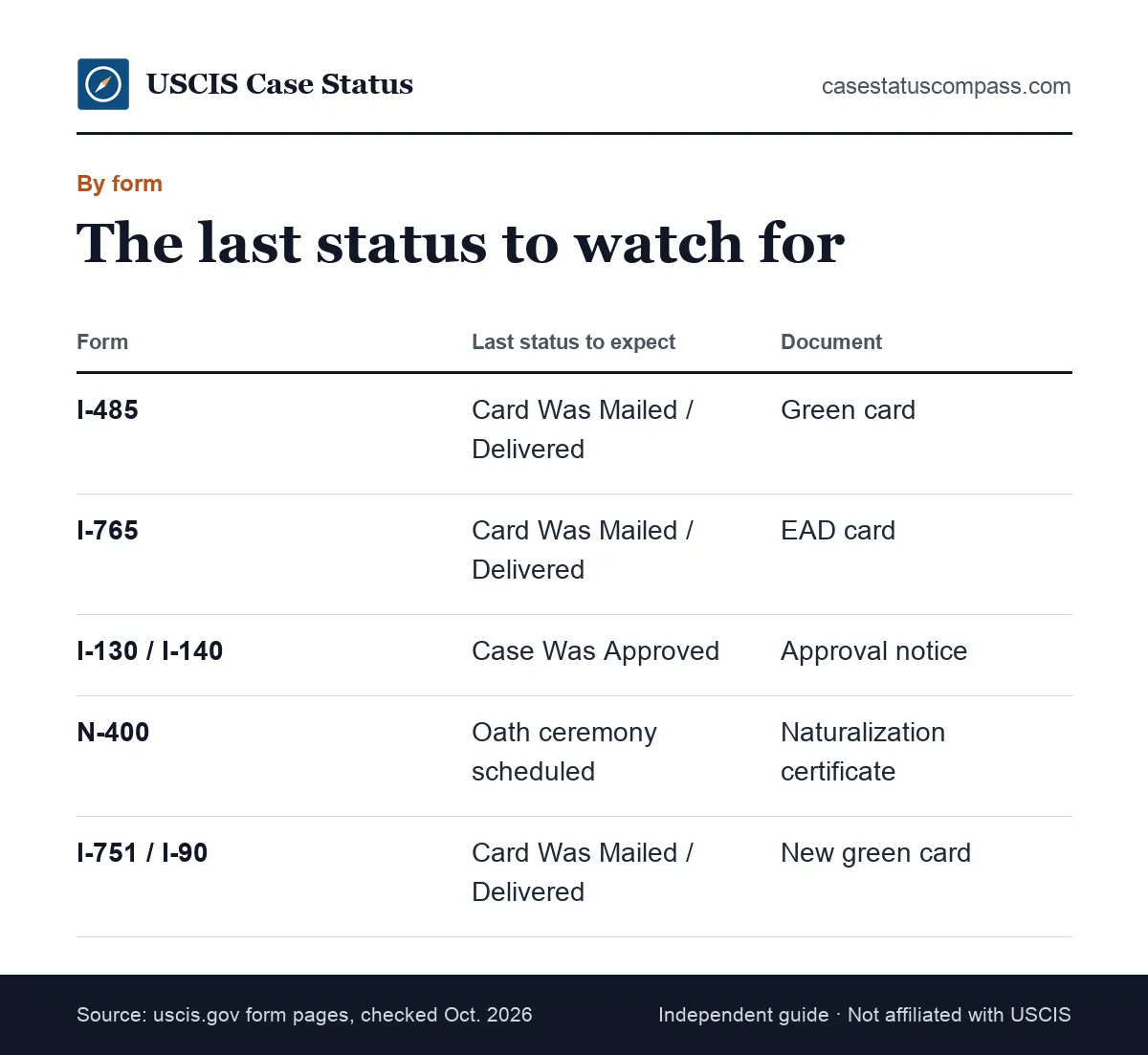
For Form I-485, the green card application filed inside the United States, statuses usually run from received to biometrics, review, a possible interview, approval and card mailing. The I-485 often travels with companion forms that have their own receipts. Track each one separately, because the work permit or travel document can move ahead of the green card itself.
Signals worth watching
The interview notice and any RFE are the key mid-case updates. A "card being produced" message is the clearest sign of a green card approval. Our Form I-485 guide explains each stage of adjustment of status.
Companion forms move separately
The work permit and travel document in a package can be approved months before the green card, or after it. A change on one receipt says nothing about the others, so track each receipt number separately.
USCIS Case Status Meanings for Work Permits
For Form I-765, the work permit application, the status path is short: received, sometimes biometrics, then approval and card production. Many EAD cases skip a separate approval message and go straight to New Card Is Being Produced, which itself signals approval.
Renewal timing matters
For renewals, the new case affects your right to keep working. The rule changed: Ended: renewals filed on or after Oct. 30, 2025 no longer get the up-to-540-day automatic extension (exceptions: TPS by law/Federal Register notice; STEM OPT 180 days). Our work permit guide explains who is affected.
Status Messages for Petitions: I-130 and I-140
Petitions such as Form I-130 for family and Form I-140 for workers usually end at "Case Was Approved." No card follows from USCIS. If the beneficiary is abroad, the next updates come from the State Department, not from Case Status Online.
What petition approval really means
Approval confirms the relationship or job offer qualifies. It does not grant a green card; the beneficiary still needs Form I-485 or a visa abroad. See our Form I-130 petition and Form I-140 immigrant worker guides.
A quiet status after petition approval
Once the petition is approved and sent on, the USCIS status usually stops changing for good. That is expected, so check the next agency's tracker instead. For consular cases, that means the NVC case status tools, where you log in with the case number from the NVC Welcome Letter.
Status Messages for Naturalization (Form N-400)
For Form N-400, statuses typically run from received through biometrics to an interview, a decision and an oath ceremony. The case is not complete when the status says approved: you become a citizen only after the Oath of Allegiance.
Interview and oath messages
Watch for "Interview Was Scheduled" and later an oath ceremony message. Some offices offer a same-day oath. If you cannot attend the ceremony, return Form N-445 with a letter asking for a new date. Our citizenship application guide explains each step from filing to ceremony.
Status Messages for Card Renewals and Conditions
Form I-751, which removes conditions on a 2-year green card, and Form I-90, which renews or replaces a card, both end with a new card. Their receipt notices carry extra weight because they extend proof of status while the case is pending.
Form I-751 receipt as proof
For conditional residents: I-751 receipt notice extends conditional status and work authorization for 48 months. Keep the notice with your card. Our I-751 removal of conditions guide covers interviews and waivers.
Form I-90 receipt as proof
For card renewals: I-90 receipt notice + expired card = proof of status for 36 months from the card's expiration date. Our green card renewal guide covers the process.
Which Statuses Need Action From You?
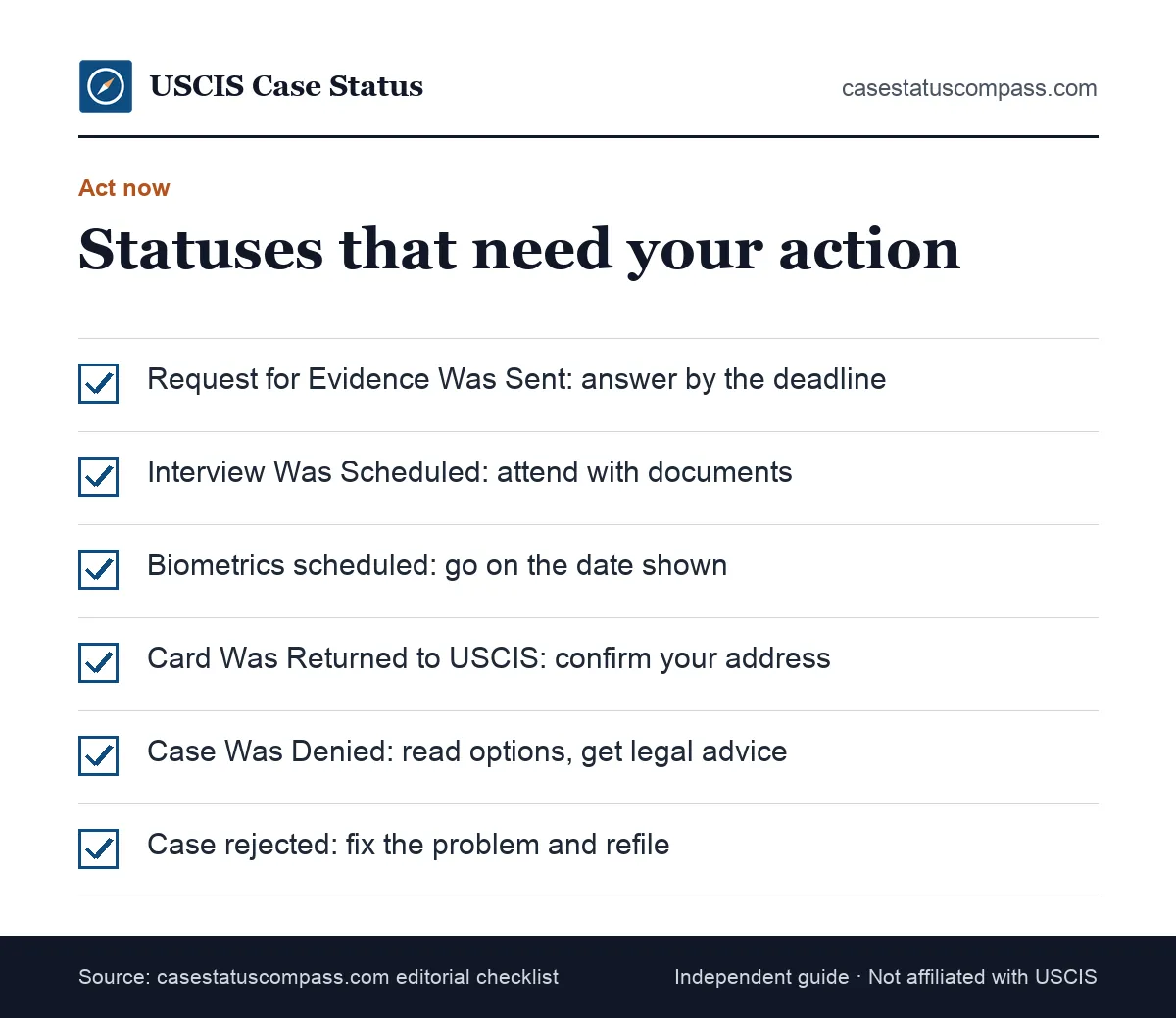
Only a few statuses need action from you: an evidence request, an interview or biometrics appointment, a returned card, a denial or a rejection. Each comes with a notice and a date. Every other status only asks you to wait and keep your mailing address current.
Action needed and first step by status
Use this table to decide quickly whether a status asks something of you, and what to do first if it does.
| Status | Action needed? | First step |
|---|---|---|
| Case Was Received | No | Check the notice for errors |
| Biometrics scheduled | Yes | Attend or reschedule |
| Actively reviewed / still processing | No | Wait; watch mail |
| Request for evidence sent | Yes | Respond by the deadline |
| Interview scheduled | Yes | Prepare and attend |
| Approved | No | Wait for notice and card |
| Card returned | Yes | Fix address, contact USCIS |
| Denied | Yes | Read options, get advice |
Deadlines you cannot miss
RFE and NOID deadlines are fixed. Missing biometrics or an interview without rescheduling can stop a case. Put every date in your calendar the day the notice arrives. One counting rule helps: If USCIS mailed the notice, add 3 days to the deadline.
Habits that help with any status
Keep your address current, open every USCIS envelope promptly and store copies of every notice. These habits prevent most avoidable delays, whatever the label says. A move must be reported within 10 days, online through your account or on Form AR-11.
Which Statuses Mean You Should Simply Wait?
Intake confirmations, "still being processed", "actively reviewed", transfers and card production all mean you should wait. These messages record USCIS's work, not yours. An inquiry during these stages rarely helps unless your case is past the posted processing time.
How to wait well
Check every week or two rather than daily. Watch your mail and account documents, and compare your case age with the official time monthly. Between checks, gather papers you may need later, such as tax returns or proof of relationship, so an RFE does not catch you unprepared.
How USCIS Case Status Meanings Fit Together
USCIS case status meanings fit together as three layers: the online label says what happened, the mailed notice proves it, and the processing time shows whether the pace is normal. Reading all three gives the full picture; reading only the label often causes needless worry.
Label, notice and clock
When a status changes, check three things in this order:
- Label: the online status shows the latest action.
- Notice: the Form I-797 proves it and adds details.
- Clock: the processing time tool shows if timing is normal.
One case or a package of cases
A green card filing is often several cases at once, each with its own receipt number. They share biometrics but move at different speeds. Match each notice to the right receipt number before reading meaning into it.
Online Status or Paper Notice: Which Should You Trust?
Trust the notice over the online status. The notice is the official record of what USCIS decided or requested, with dates and instructions. The online label is a summary that can lag, use generic wording or briefly show an error during system updates.
When they disagree
Follow the notice and contact USCIS if the mismatch lasts. Short mismatches often clear within days as systems sync. As USCIS explains, I-797C = Notice of Action (receipt, rejection, transfer, appointment, re-open); not proof of status by itself.
Spotting fake notices
Scammers copy USCIS wording in letters and emails. Real notices carry your receipt number, which you can check in the official tool. Learn how to verify a USCIS notice is real.
What Should You Do When Your Status Is Not Updating?
When your status is not updating, first confirm the case is still within the posted processing time. If it is, keep waiting. If it is past that time, submit a case inquiry, confirm your address on file, and keep notes of every contact with USCIS.
Quick checks before an inquiry
- Check your account for notices the public tool does not show.
- Confirm the address USCIS has for you.
- Compare your receipt date with the posted time.
- Look for a transfer that reset the queue.
Escalation options
Other routes include an expedite request for urgent reasons, the CIS Ombudsman or a congressional office. Our contact USCIS guide explains phone, chat and appointment options. Most of these routes expect a standard inquiry first; the Ombudsman, for example, asks that you contact USCIS before requesting help.
Common Misreadings of Status Messages
The most common misreadings treat a neutral message as good or bad news. People read "actively reviewed" as approval, a transfer as trouble, a date change as progress and silence as a lost file. In most cases, the status simply records a routine step.
Reading too much into a label
A label never shows how strong your case is. Decisions arrive in writing, with reasons when needed. An approval can follow a quiet month, and an RFE does not mean a denial is coming. Judge your case by the notices you receive, not by how often the label changes.
Statuses That Mean Another Agency Takes Over
Some statuses mean your case leaves USCIS's hands. An approved petition for someone abroad moves to the State Department, and some cases involve immigration court. After that hand-off, the USCIS status usually stops changing and another agency's tools take over.
State Department and the NVC
After petition approval, the NVC collects fees and documents, then a consulate holds the visa interview. See our US visa status guide and the visa bulletin for category movement.
Immigration court
Removal cases belong to the Executive Office for Immigration Review (EOIR), part of the Department of Justice. USCIS labels do not track hearings; see our immigration court case status guide.
Keeping a Status Log for Your Case
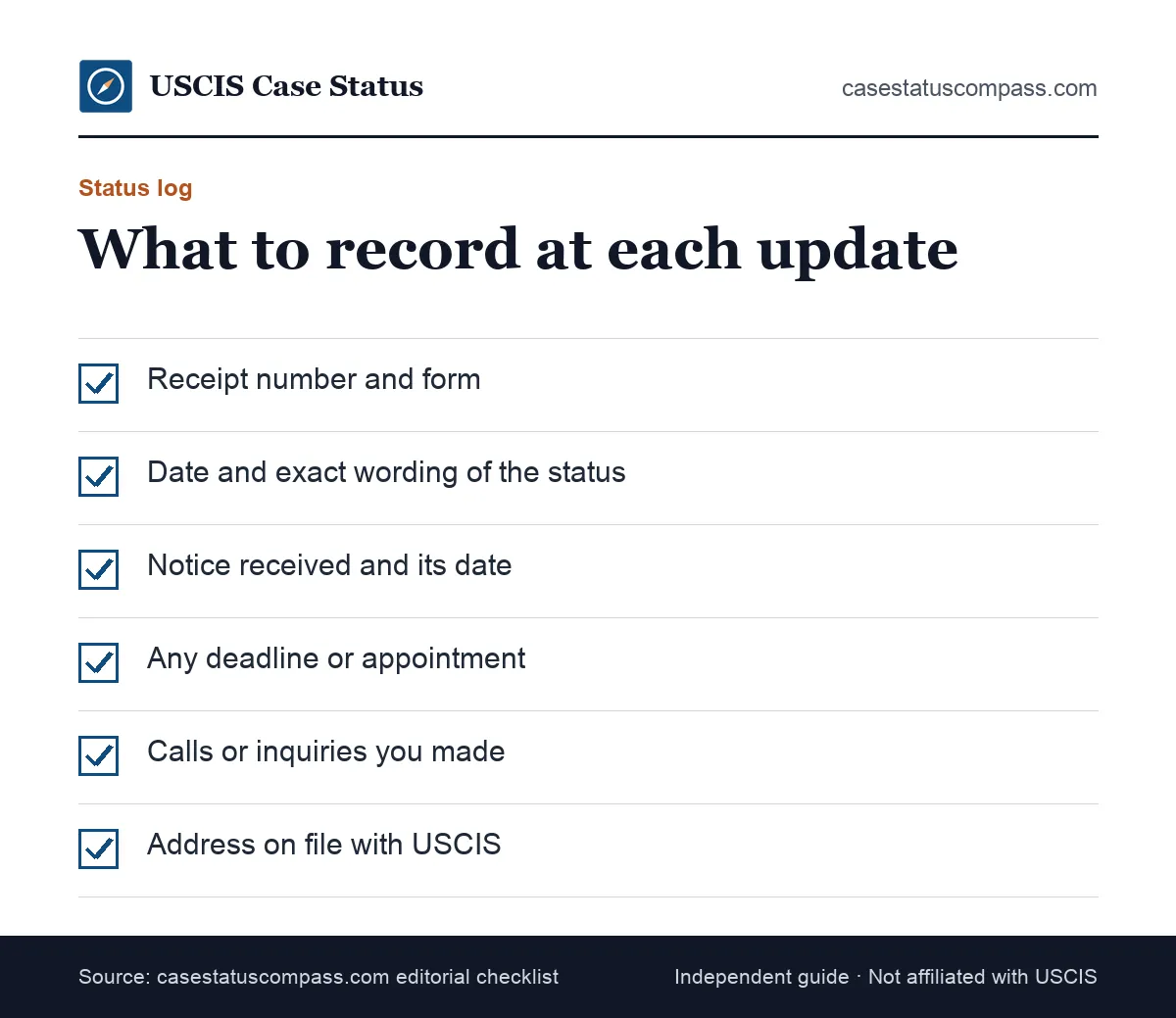
A status log is a simple record of every change, notice and deadline on each receipt number. It helps you spot real delays, answer USCIS questions quickly and give an attorney a clear timeline. A notebook or spreadsheet works fine.
What to record
Write the date and exact wording of each status, the notice received, any deadline, and every call with its reference number. Note the address USCIS has on file. Keep the log in one place, paper or digital.
How the log helps later
An inquiry is stronger with clear dates: you can tell the Contact Center or the Ombudsman exactly when each update and notice came. It also saves hours if you change attorneys, because the case history is already written down.
When Should Your Status Prompt Legal Help?
Your status should prompt legal help when it shows a denial, a NOID, an RFE you do not understand, an unexpected reopened or closed case, or a notice about immigration court. These situations carry strict deadlines and lasting consequences, so act quickly.
Who to contact
Speak with an immigration attorney or a DOJ-accredited representative at a recognized nonprofit. Bring every notice and your status log. This guide explains statuses in general and is not legal advice.
Frequently Asked Questions
What is the order of USCIS case statuses?
For most card-based cases the order is received, biometrics, actively reviewed, approved, card produced and card mailed. An RFE, interview or transfer can appear during review. Petitions without a card usually end at approval. Cases can skip steps, so treat the order as a pattern, not a checklist.
Does every case show every status?
No. Many cases skip messages. A work permit may jump from received to card production, and some cases never show a biometrics or interview update. What you see depends on the form, the office and whether USCIS needed anything extra before deciding.
How quickly does the online status update after a notice is mailed?
The online status often updates the same day or within a few days of the action, while mail can take longer. Sometimes the notice arrives first and the label catches up. If either is missing for more than a few weeks, check your online account.
Can USCIS change a decision after showing "Case Was Approved"?
It is rare, but USCIS can reopen a decision on its own motion if it finds an error or new information, and it would send a written notice explaining why. A display glitch that briefly shows an older status is far more common than a real reversal.
Why does my status show a form I did not file?
Each form in a package gets its own receipt number, and a biometrics or interview message may refer to the main application. If the receipt number and form truly match nothing you filed, contact USCIS with your notice in hand.
Is it safe to share my status message with others?
Sharing the wording of a status is generally safe. Be careful with your receipt number, since anyone who has it can look up your case. Never share your USCIS account password, and never pay anyone who offers to change or speed up a status.
Sources
- USCIS: Checking Your Case Status Online. www.uscis.gov/tools/checking-your-case-status-online. Accessed Oct 27, 2026.
- USCIS: Form I-797 Types and Functions. www.uscis.gov/forms/filing-guidance/form-i-797-types-and-functions. Accessed Oct 27, 2026.
- USCIS: Benefits of a USCIS Online Account. www.uscis.gov/file-online/benefits-of-a-uscis-online-account. Accessed Oct 27, 2026.
- USCIS: Check Case Processing Times. egov.uscis.gov/processing-times/. Accessed Oct 27, 2026.
- USCIS: Historical National Median Processing Time (data as of March 5, 2024). www.uscis.gov/newsroom/fact-sheets. Accessed Oct 27, 2026.
- USCIS: Removing Conditions on Permanent Residence Based on Marriage. www.uscis.gov/green-card/after-we-grant-your-green-card/conditional-permanent-residence/removing-conditions-on-permanent-residence-based-on-marriage. Accessed Oct 27, 2026.
- USCIS: Replace Your Green Card. www.uscis.gov/green-card/after-we-grant-your-green-card/replace-your-green-card. Accessed Oct 27, 2026.
- USCIS Contact Center. www.uscis.gov/contactcenter. Accessed Oct 27, 2026.
- USCIS Form G-1055 Fee Schedule, Edition 10/16/26. www.uscis.gov/sites/default/files/document/forms/g-1055.pdf. Accessed Oct 27, 2026.
- USCIS: Automatic EAD Extension (updated 10/29/2025). www.uscis.gov/working-in-the-united-states/information-for-employers-and-employees/automatic-employment-authorization-document-ead-extension. Accessed Oct 27, 2026.
- 8 CFR 103.8(b) (LII). www.law.cornell.edu/cfr/text/8/103.8. Accessed Oct 27, 2026.
casestatuscompass.com is an independent publication and is not affiliated with USCIS or any government agency. This page is general information, not legal advice. For denials, court or asylum matters, consult an immigration attorney or a DOJ-accredited representative.